Dell

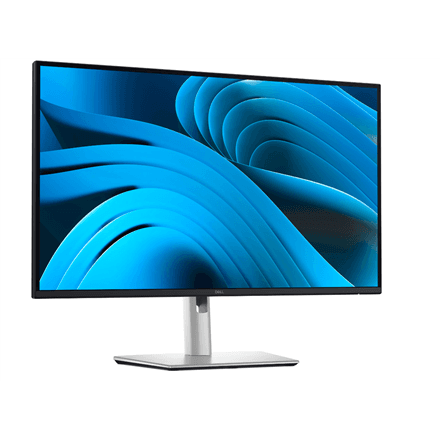
Dell P2725DE monitor 27" QHD IPS 100 Hz USB-C 90 W USB-A, 8 ms

The Dell P2725DE is a 27-inch QHD IPS monitor that turns a desk into a complete work setup for your laptop: one USB-C cable supplies up to 90 W, the network cable goes into the monitor's RJ-45 jack and peripherals connect over USB-A. Its 2560 × 1440 pixels and 100 Hz refresh rate make work with spreadsheets, documents and multiple windows comfortable.

  • Display: 27″, 2560 × 1440 (QHD), 16:9 aspect ratio
  • Panel and refresh rate: IPS, up to 100 Hz, 8 ms response time
  • Brightness: 350 cd/m², 16.7 million colours, 178° viewing angles
  • Ports: USB-C with up to 90 W, 2 × DisplayPort, 1 × HDMI, USB-A, RJ-45
  • Adjustment: height, tilt, swivel and pivot to portrait
  • Other: edge-lit LED backlight, no speakers, 6.59 kg

Description

A desk that is ready with one cable

The USB-C port supplies up to 90 W to a laptop, which is enough for most office and business models. A keyboard, mouse or other peripheral can stay plugged into the monitor's USB-A connection, and a wired network cable into its RJ-45 jack. In the morning you connect the laptop with one cable and everything you need is ready; in the evening you take it with you just as quickly. There is no need to dig the charger and adapters out of your bag every day.

QHD resolution that gives you room to work

2560 × 1440 pixels on a 27-inch screen means sharp text and noticeably more usable space than a Full HD monitor: you can keep two full-size windows side by side or see a large part of a spreadsheet at once. The IPS panel keeps colour and contrast consistent across 178° viewing angles, and 16.7 million colours give photos and presentations a natural look. Brightness of 350 cd/m² suits a bright office as well.

Several inputs and a smooth 100 Hz

Besides USB-C, the monitor has two DisplayPort inputs and one HDMI port, so a desktop PC can be connected alongside the laptop and you switch inputs from the menu. The 100 Hz refresh rate makes scrolling and moving windows smoother than on a standard office monitor. The response time is 8 ms, which is entirely adequate for office work, video calls and videos, while fast competitive games are better served by gaming monitors.

An ergonomic stand for long days

The stand lets you raise and lower the screen, tilt it, swivel it to the sides and pivot it into portrait mode, where long documents, contracts or code are easier to read. With the top edge at eye level, your neck and shoulders stay relaxed even at the end of a long working day. The edge-lit LED backlight keeps the housing slim, there are no built-in speakers, and the monitor weighs 6.59 kg with its stand.

Who this monitor is for

Home office workers who want to connect a laptop, keyboard, mouse and network with a single cable; offices where laptops move between the desk and the meeting room; analysts and project managers who gain room for several windows from a 27-inch QHD screen; and anyone who wants a dock-free desk without a tangle of cables.

Specifications

General

BrandDell
Height adjustmentYes
Tilt adjustmentYes
PivotYes
SwivellingYes
Viewing angle, horizontal178 °
Viewing angle, vertical178 °
EAN2000001383902

Display

Display diagonal27 "
Display2560 x 1440 pixels
HD typeQHD
Panel typeIPS
Maximum refresh rate100 Hz
Response time8 ms
Display brightness350 cd/m²
Aspect ratio16:9
TV tuner integratedNo
Display number of colours16.7 M

Audio

Built-in speaker(s)No

Ports

Ethernet LAN (RJ-45) portsYes
HDMI ports quantity1
DisplayPorts quantity2
USB-CYes
USB-C power delivery90W

Connectivity

ConnectivityHDMI, DisplayPort, USB-C, USB Type-A, RJ45

Features

Backlight typeLED Edgelight System

Dimensions & weight

Net weight6.59 kg

Questions & answers

Can I charge a laptop over USB-C?

Yes, the monitor supplies up to 90 W over USB-C. That is enough for most office laptops; more powerful models may need their own charger.

Can the monitor be mounted on an arm?

The data for this product does not list a VESA interface. Before choosing an arm, it is worth checking the mounting dimensions in Dell's technical data.

Can I connect two computers?

Yes, there are several inputs: USB-C, two DisplayPort and HDMI, and you switch between them in the monitor menu. The manufacturer does not specify a KVM function.

Does the monitor have speakers?

No, there are no built-in speakers. Sound comes from the computer, headphones or separate speakers.

How does this variant differ from the other P2725DE?

The data for this product lists an 8 ms response time and names USB-A among the connections. Resolution, refresh rate, brightness, USB-C 90 W and RJ-45 are the same.

Reviews

No reviews yet

Bought this product? Be the first to share your experience.

Write a review

Only verified buyers can leave reviews.