LG

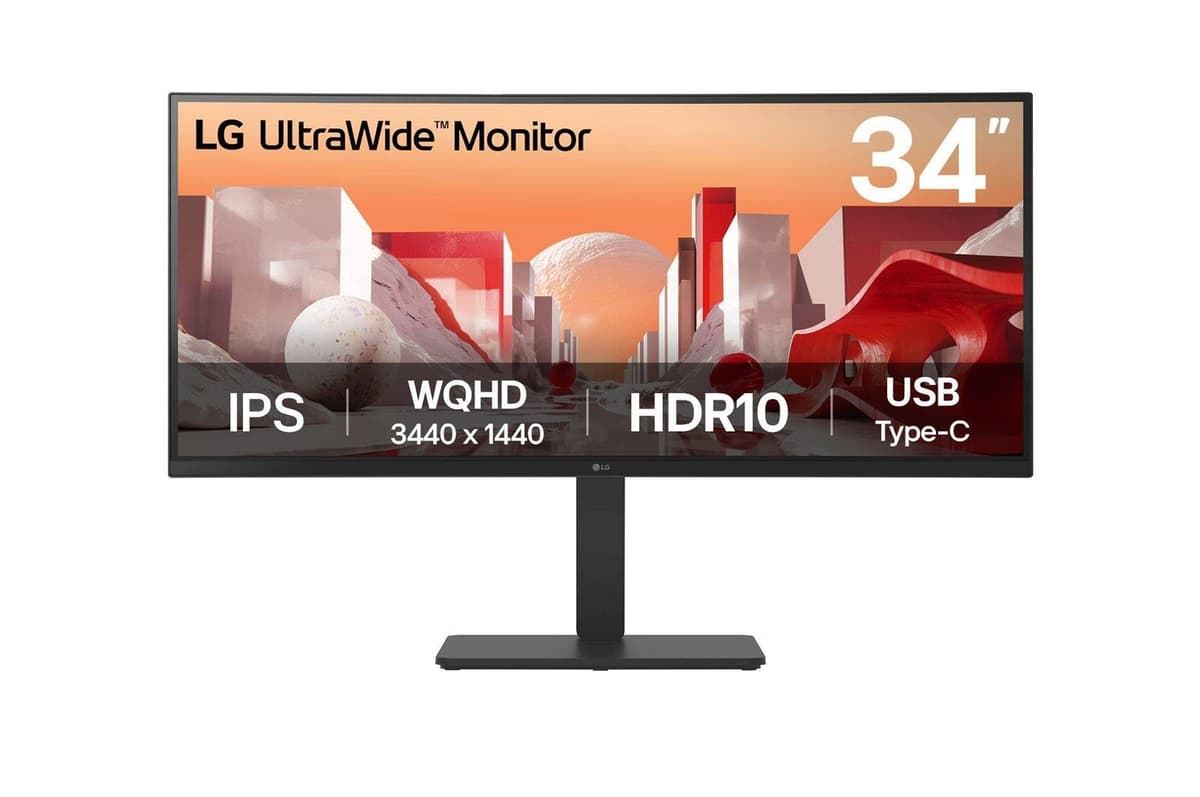
LG 34BA75QE-B curved monitor 34" WQHD IPS USB-C 90 W KVM

The LG 34BA75QE-B is a 34-inch curved ultrawide office monitor that organises your desk around a single cable: its USB-C port charges a laptop at up to 90 W, and it adds four USB-A ports, Ethernet and a KVM switch. An IPS panel at 3440 × 1440, 99% sRGB coverage and 150 mm of height adjustment make long working days comfortable.

  • Display: 34″, 3440 × 1440 (WQHD), 21:9, 3800R curve
  • Panel and refresh rate: IPS, 60 Hz, 5 ms, 1.07 billion colours
  • Brightness and HDR: 300 cd/m², 1000:1 contrast, HDR10, 99% sRGB
  • Ports: USB-C (up to 90 W), 2 × HDMI 2.0, DisplayPort, 4 × USB-A, RJ-45, KVM
  • Adjustment: 150 mm height, tilt −5 to 21°, swivel ±45°
  • Ergonomics: VESA 100 × 100, flicker-free, 2 speakers totalling 10 W, internal power supply

Description

One cable from laptop to monitor

The USB-C port supports USB PD charging at up to 90 W, so many laptops can draw power straight from the monitor and there is no need for a separate charger on the desk. Four USB-A ports and an Ethernet jack on the monitor bring the mouse, keyboard, webcam and wired network together in one place. In an office, that means plugging in and unplugging a laptop takes a couple of moves.

KVM and picture-by-picture for two computers

The built-in KVM switch lets you control two computers with the same keyboard and mouse, for example a work laptop and a personal desktop. In picture-by-picture (PbP) mode the image from two sources is shown side by side, so you see both machines at once. Two HDMI 2.0 ports and a DisplayPort leave enough inputs for a docking station or a third device.

An ultrawide IPS screen with a 3800R curve

The 21:9 format and 3440 × 1440 pixels give you the width of two standard monitors without a bezel in between: a spreadsheet, email and a video call fit side by side. The gentle 3800R curve keeps the edges better in view without distorting the image. The IPS panel covers 99% of sRGB, shows 1.07 billion colours and its 178° viewing angles keep colours even. Black Stabilizer brings out detail in dark areas, and Super+ Resolution sharpens lower-resolution images.

A stand that helps you sit right

Height adjusts over 150 mm, the screen tilts from −5° to 21° and swivels ±45°, so it is easy to turn it towards a colleague. Flicker-free backlighting reduces eye strain. The VESA 100 × 100 mount fits monitor arms. The power supply is built into the monitor, so there is no separate adapter under the desk. It weighs 11 kg with the stand and 7.5 kg without it.

Sound and environmental certifications

Two built-in speakers with 10 W total output handle video calls and presentation audio, and there is a separate headphone output. The monitor carries ENERGY STAR, EPEAT and TCO certifications, which many companies and public tenders require, and its typical power consumption is 29 W. The SDR energy class is F.

Who this monitor is for

Offices and home offices where the laptop connects with one USB-C cable and the charger stays in the bag; employees who work on two computers and want a single keyboard and mouse; analysts and accountants who gain room in spreadsheets from the wide screen; and IT departments that need a certified, well-adjustable business monitor.

Specifications

General

BrandLG
Market positioningBusiness
Product colourBlack
VESA mountingYes
SwivellingYes
AMD FreeSyncNo
Headphone outYes
NVIDIA G-SYNCNo
Tilt adjustmentYes
Tilt angle range-5 - 21
Height adjustmentYes
Swivel angle range-45 - 45
Adjustable height (max)150
Viewing angle, vertical178
Picture-by-Picture (PbP)Yes
Viewing angle, horizontal178
EAN8806096207345

Display

Display diagonal34″
Display diagonal (metric)87 cm
Display resolution3440 x 1440
HD typeWide Quad HD
Panel typeIPS
Display technologyLCD
Maximum refresh rate60 Hz
Native aspect ratio21:9
TouchscreenNo
Contrast ratio (typical)1000:1
High Dynamic Range (HDR) supportedYes
High Dynamic Range (HDR) technologyHigh Dynamic Range 10 (HDR10)
Screen shapeCurved
Panel mounting interface100 x 100
Response time5
On Screen Display (OSD)Yes
Screen curvature rating3800R
Display number of colours1.07 billion colours
Display brightness (typical)300

Camera

Built-in cameraNo

Audio

Number of speakers2
RMS rated power10 W
Built-in speaker(s)Yes

Ports

HDMI ports quantity2
HDMI version2.0
USB Power Delivery (USB PD)Yes
Ethernet LANYes
HDMIYes
Built-in USB hubYes
DisplayPorts quantity1
USB upstream port typeUSB Type-A
Number of upstream ports1
USB Power Delivery up to90
USB Type-A downstream ports quantity4
USB Type-C downstream ports quantity1

Keyboard & controls

Built-in KVM switchYes

Battery & power

Power consumption (typical)29 W
Power consumption (standby)0.5 W
Energy efficiency classF
Energy efficiency class (SDR)F
Energy efficiency class (HDR)G
Energy consumption (SDR) per 1000 hours29 kWh
Energy consumption (HDR) per 1000 hours42 kWh
AC input voltage100 – 240 V
AC input frequency50/60
Power supply typeInternal

Performance & capacities

sRGB coverage (typical)99

Features

Flicker-free technologyYes
Sustainability certificatesENERGY STAR/EPEAT/TCO

Dimensions & weight

Product Net Weight11 kg
Width (with stand)816.7 mm
Height (with stand)543.5 mm
Depth (with stand)267.5 mm
Weight (with stand)11 kg
Width (without stand)816.7 mm
Height (without stand)364.4 mm
Depth (without stand)83.6 mm
Weight (without stand)7.5 kg

Questions & answers

How much power does USB-C deliver to a laptop?

The manufacturer lists USB PD charging of up to 90 W. Actual charging speed depends on what the laptop itself supports.

Can I use two computers with this monitor?

Yes, the built-in KVM switch lets you control two computers with the same keyboard and mouse, and PbP mode shows two sources side by side.

Is it suitable for gaming?

The refresh rate is 60 Hz, and the manufacturer lists no AMD FreeSync or NVIDIA G-SYNC support. Relaxed games are fine, while fast-paced games call for a higher refresh rate monitor.

Can the monitor be mounted on a wall or arm?

Yes, it has a VESA 100 × 100 mount that fits standard wall mounts and monitor arms.