GIGABYTE

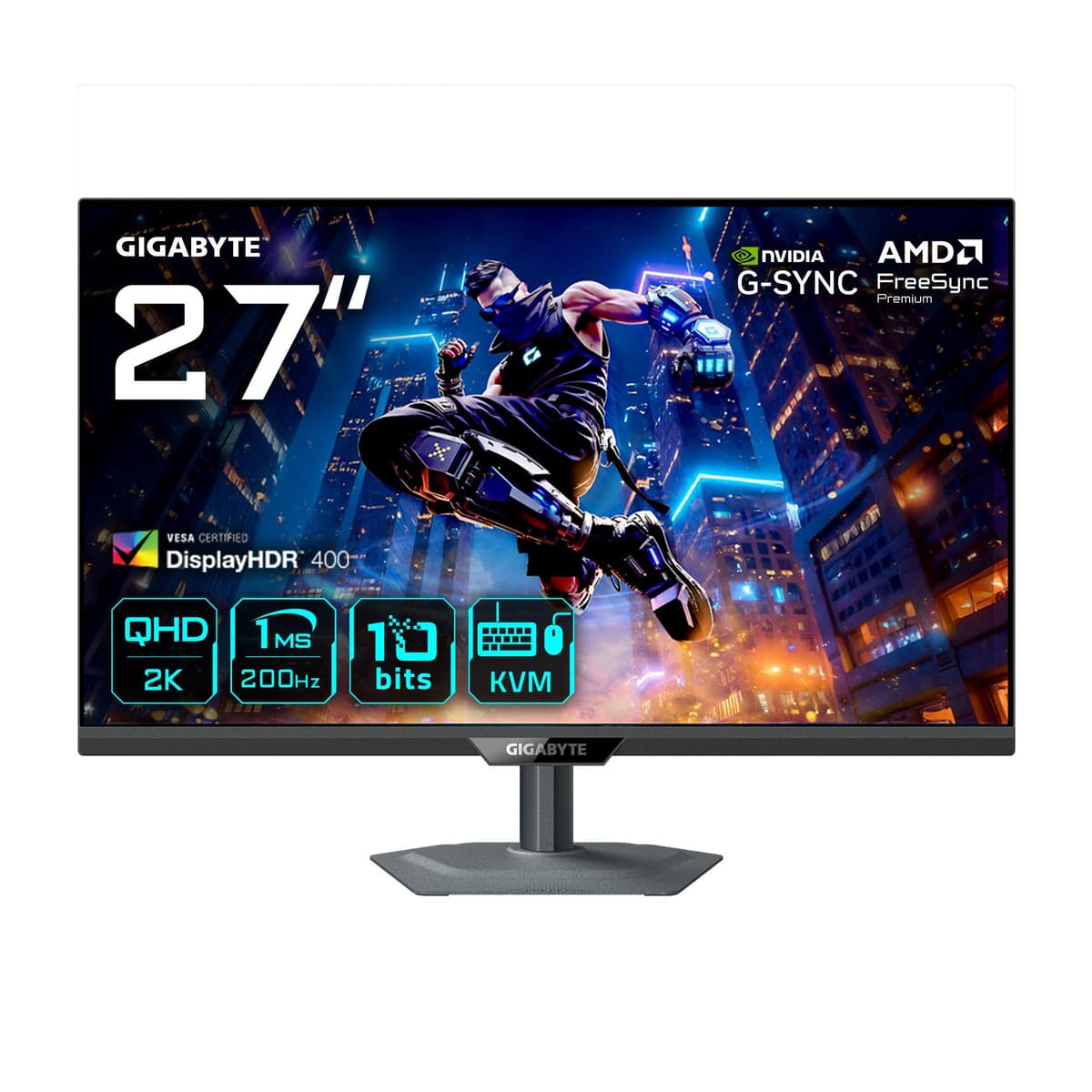
Gigabyte M27Q2 EK gaming monitor 27" QHD SS IPS 200 Hz KVM

The Gigabyte M27Q2 EK (M27Q2 QD) is a 27-inch QHD gaming monitor with Quantum Dot technology covering 99% of DCI-P3. Its SS IPS panel runs at 200 Hz, and the KVM function plus USB-C let you control two computers with one keyboard and mouse.

  • Display: 27″, 2560 × 1440 (QHD, 16:9), anti-glare
  • Panel and refresh rate: SS IPS, 200 Hz (OC 210 Hz), 1 ms (GTG)
  • Image: Quantum Dot, 99% DCI-P3, DisplayHDR 400, 350 cd/m² brightness
  • Ports: 2 × HDMI 2.0, DisplayPort 1.4, USB-C (DP Alt Mode, 18 W), 2 × USB-A, 3.5 mm jack
  • Adjustments: 130 mm height, −5 to 21° tilt, swivel, 90° pivot
  • Other: KVM, FreeSync Premium, VESA 100 × 100 mm, 5.91 kg with stand

Description

Quantum Dot and 200 Hz for a lively picture

The Quantum Dot layer widens the colour gamut to 99% DCI-P3, so games and films look more saturated than on a typical sRGB screen, and DisplayHDR 400 adds contrast to bright scenes. A 200 Hz refresh rate, which can be overclocked to 210 Hz, and a 1 ms response time keep motion smooth. FreeSync Premium removes tearing and stutter even when the frame rate fluctuates.

Who this gaming monitor is for

People who have a work laptop and a gaming PC on the same desk. The KVM function lets one keyboard and mouse switch between both devices, while USB-C carries the laptop image and supplies it with up to 18 W of power. The fully adjustable stand works for a workday and a gaming evening alike, and headphones plug straight into the monitor's 3.5 mm jack. There are no speakers.

Specifications

General

BrandGIGABYTE
Market positioningGaming
Product colourBlack
VESA mountingYes
PivotYes
Feet colourBlack
Pivot angle0 - 90
Pixel pitch0.2331 x 0.2331
AMD FreeSyncYes
Colour depth8
Bullet Points<ul> <li>27-inch SuperSpeed IPS panel with QHD resolution</li> <li>200Hz refresh rate (OC 210Hz) , 1ms response time</li> <li>Supports DisplayHDR 400, FreeSync Premium, and G-SYNC Compatible</li> <li>KVM cross-platform control</li> <li>Quantum Dot Technology</li> <li>Colour: 10 bits colour depth with 99% DCI-P3 / 83% BT.2020 colour gamut</li> <li>Ergonomic design: Tilt, swivel, pivot, and height adjustments</li> </ul>
Headphone outYes
NVIDIA G-SYNCNo
Tilt adjustmentYes
Long DescriptionGIGABYTE M27Q2 QD 27&rdquoQHD Gaming Monitor - 2560 x 1440, 200Hz, 1ms, 350 cd/m&sup2, FreeSync Premium, Display HDR400, HDMI 2.0, Displayport 1.4. Display diagonal: 68.6 cm (27&quot), Display resolution: 2560 x 1440 pixels, HD type: Quad HD, Display technology: LED, Response time: 1 ms, Native aspect ratio: 16:9, Viewing angle, horizontal: 178&deg, Viewing angle, vertical: 178&deg. Built-in USB hub, USB hub version: 3.2 Gen 1 (3.1 Gen 1). VESA mounting, Height adjustment. Product colour: Black
Tilt angle range-5 - 21
AMD FreeSync typeFreeSync Premium
Headphone outputs1
Height adjustmentYes
Quick start guideYes
Swivel angle range0 - 15
Adjustable height (max)130
Viewable size, vertical335.664
Viewing angle, vertical178
Viewable size, horizontal596.736
Viewing angle, horizontal178
Warranty3 years
EAN889523049891

Display

Display diagonal27″
Display resolution2560 x 1440
HD typeQuad HD
Panel typeSS-IPS
Display technologyLED
Maximum refresh rate200 Hz
Native aspect ratio16:9
Anti-glare screenYes
TouchscreenNo
Colour gamut99 %
Contrast ratio (typical)1000:1
High Dynamic Range (HDR) supportedYes
High Dynamic Range (HDR) technologyDisplayHDR 400
Screen shapeFlat
Panel mounting interface100 x 100
Response time1
Colour gamut standardDCI-P3
Display number of colours1.07 billion colours
Display brightness (typical)350
Response time measurement typeGTG (Gray to Gray)

Camera

Built-in cameraNo

Audio

Built-in speaker(s)No

Ports

HDMI ports quantity2
HDMI version2.0
USB Type-C DisplayPort Alternate ModeYes
USB Power Delivery (USB PD)Yes
Cable lock slotYes
Cable lock slot typeKensington
HDMIYes
USB hub version3.2 Gen 1 (3.1 Gen 1)
Built-in USB hubYes
DisplayPort version1.4
DisplayPorts quantity1
Number of upstream ports1
USB Power Delivery up to18
USB Type-A downstream ports quantity2
USB Type-C downstream ports quantity1

Battery & power

Power consumption (typical)30 W
Power consumption (standby)0.5 W
Energy efficiency classE
Energy efficiency class (SDR)E
Energy efficiency class (HDR)G
Energy consumption (SDR) per 1000 hours19 kWh
Energy consumption (HDR) per 1000 hours36 kWh
AC input voltage100 – 240 V
AC input frequency50/60
Power supply typeInternal
Energy efficiency scaleA to G
Power consumption (off)0.3

Performance & capacities

DCI-P3 coverage99
sRGB coverage (typical)150

Features

Cables includedAC/DisplayPort/HDMI/USB
Stand includedYes
Flicker-free technologyYes

Dimensions & weight

Product Net Weight5.91 kg
Width (with stand)612 mm
Height (with stand)515 mm
Depth (with stand)192 mm
Weight (with stand)5.91 kg
Width (without stand)612 mm
Height (without stand)371 mm
Depth (without stand)59 mm
Weight (without stand)4.3 kg

Questions & answers

How does the KVM function work?

The keyboard and mouse plug into the monitor's USB ports, and the monitor routes them to whichever computer is currently on screen. That way you do not need separate accessories for the second computer.

Can I charge a laptop over USB-C?

According to the manufacturer, USB-C supplies up to 18 W. That is enough for small devices, but most laptops will still need their own charger.

Does the monitor have speakers?

No, this model has no speakers; a 3.5 mm headphone jack handles audio.

Reviews

No reviews yet

Bought this product? Be the first to share your experience.

Write a review

Only verified buyers can leave reviews.