Lexmark

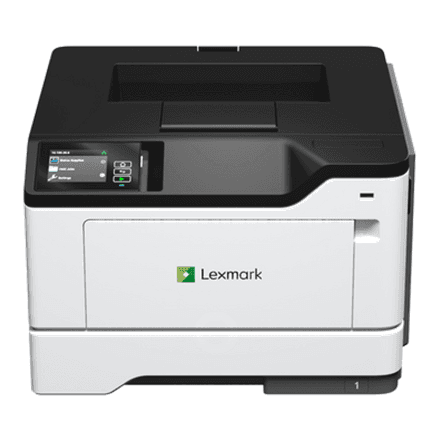
Lexmark MS531dw mono laser printer, A4, 44 ipm, duplex, Wi-Fi, LAN

The Lexmark MS531dw is a mono laser printer for offices that print a lot and need it fast: 44 pages per minute according to ISO/IEC 24734. Duplex printing, a 250-sheet input tray and both Ethernet and Wi-Fi connectivity make it a dependable network printer for the whole team.

  • Technology: mono laser printing, print only
  • Speed: 44 ipm (ISO/IEC 24734)
  • Format and duplex: up to A4, two-sided printing
  • Connectivity: Ethernet LAN, Wi-Fi
  • Paper: 250-sheet input, 150-sheet output
  • Resolution: up to 1200 × 1200 dpi
  • Media: plain paper, labels, card stock, envelopes

Description

44 pages a minute when it is urgent

The 44 ipm rating is measured to ISO/IEC 24734, which uses typical office documents rather than a blank page with a single line of text. That makes the figure a good guide to real-world pace: a ten-page contract lands in the tray in under half a minute. A fast printer pays off most when several people send jobs at once and nobody wants to wait in the queue.

Duplex printing and generous trays

The printer supports duplex printing, so long documents use half the sheets and paper consumption drops. The standard input tray holds 250 sheets, so paper does not need topping up every day, and the output tray takes 150 sheets. The maximum format is A4, covering invoices, contracts, reports and letters.

Sharp text at 1200 × 1200 dpi

A maximum resolution of 1200 × 1200 dpi means small type, fine lines and barcodes print crisply and legibly. Besides plain paper, the printer handles label stock, card stock and envelopes. For speciality media the manufacturer points to the Lexmark Paper and Specialty Media Guide, which lists suitable weights and types.

A network printer over LAN and Wi-Fi

The MS531dw joins the office network by Ethernet cable or wirelessly over Wi-Fi. As a network printer it is available to every computer on the same network and is not tied to a single desk. Wi-Fi also lets you place it where a network cable does not reach. The printer weighs 15.3 kg, so it needs a sturdy surface.

Just a printer, nothing extra

This is a pure printer: there is no scanner, copier or fax on this model. That is a deliberate choice for offices where scanning is handled by a separate device or not needed at all, and where the printer is expected to deliver fast, clean black-and-white output and nothing else. Fewer functions also mean simpler setup and maintenance.

Who this laser printer is for

Offices and teams that print plenty of black-and-white documents every day: contracts, invoices, reports and dispatch notes. It also suits warehouses and logistics teams that print labels and envelopes, and organisations where several people share one network printer and time spent waiting in the queue is costly.

Specifications

General

BrandLexmark
Product typePrinter
Duplex functionsYes
FaxingNo
FunctionsPrint
Maximum print sizeA4
Media typePaper Labels, Card Stock, Plain Paper, Envelopes, Refer to the Paper & Specialty Media Guide
PrintingMono
Printing coloursBlack
ScanningNo
EAN734646731423

Display

Maximum resolution1200 x 1200 DPI

Storage

Standard input capacity250 sheets
Standard output capacity150 sheets

Ports

Ethernet LANYes

Connectivity

Wi-FiYes

Performance & capacities

Print speed (ISO/IEC 24734) mono44 ipm

Features

Print technologyLaser

Dimensions & weight

Net weight15.30 kg

Questions & answers

Does the MS531dw print on both sides of the paper?

Yes, the printer supports duplex printing. The maximum format is A4.

Can I print over Wi-Fi?

Yes, the printer has both Wi-Fi and Ethernet LAN, so every computer on the same network can print to it.

Can it scan or copy?

No. The MS531dw is a printer only: there is no scanning, copying or fax on this model.

Can it print on envelopes and labels?

Yes, supported media are plain paper, labels, card stock and envelopes. Exact weights are given in the Lexmark Paper and Specialty Media Guide.

Which toner cartridge does this printer use?

The manufacturer does not specify the supply code in this data. The correct cartridge is listed in the printer manual and in the printer menu.

Reviews

No reviews yet

Bought this product? Be the first to share your experience.

Write a review

Only verified buyers can leave reviews.