AXAGON

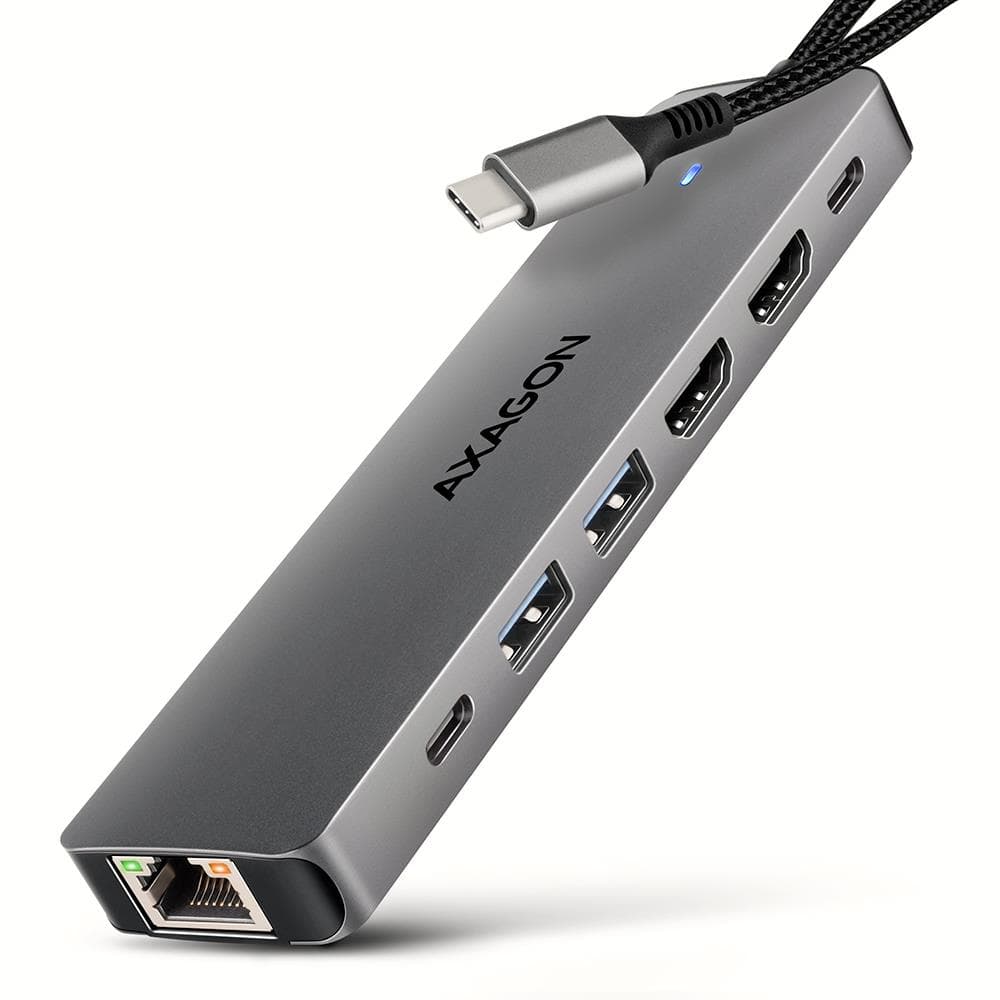
AXAGON HMC-U4 USB4 docking station 12-in-1, HDMI + DP 8K, 100 W, SD UHS-II

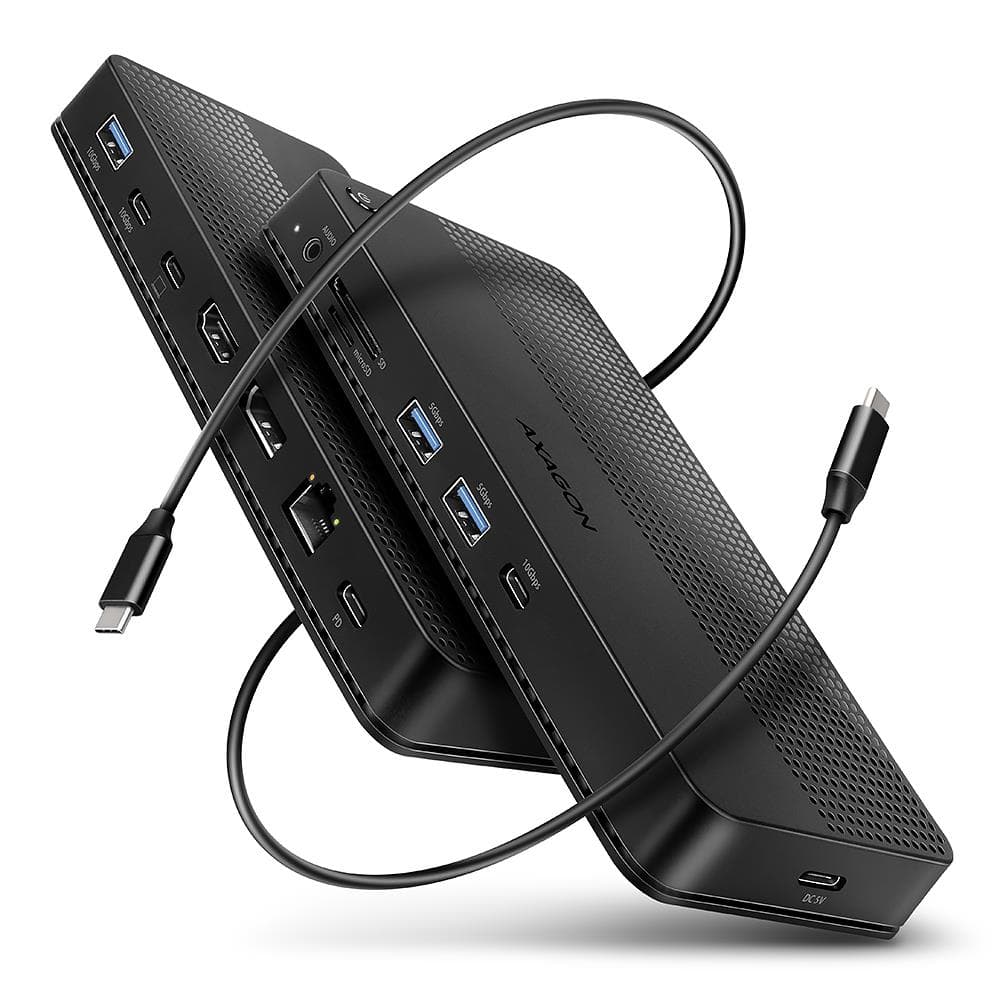
The AXAGON HMC-U4 is a 12-in-1 USB4 docking station with up to 40 Gbit/s of bandwidth that connects two monitors, five USB devices, Gigabit Ethernet and a fast SD UHS-II card reader to a laptop. The laptop can charge through the dock at up to 100 W, and the dock also works with Thunderbolt 3 and 4 ports.

  • Host connection: USB4 40 Gbit/s, 80 cm USB-C cable; compatible with Thunderbolt 3/4 and USB 10/5 Gbit/s
  • Video outputs: HDMI and DisplayPort; 1 display up to 8K 30 Hz or 4K 144 Hz, 2 displays up to 4K 144 Hz + 4K 60 Hz
  • Charging: USB-C PD 3.0 input up to 100 W; extra 5 V power via USB-C
  • USB ports: 2 × USB-C 10 Gbit/s, 1 × USB-A 10 Gbit/s, 2 × USB-A 5 Gbit/s
  • Cards, network, audio: SD UHS-II and microSD UHS-I, 1 Gbit/s RJ-45, 3.5 mm headset jack
  • Size: 188 × 80 × 20 mm, 164 g without cable, power button

Description

Two monitors and a fast card reader

On a laptop with USB4 or Thunderbolt 4, the DisplayPort output runs at up to 4K 144 Hz while HDMI runs at up to 4K 60 Hz; from a 10 Gbit/s USB-C port the two-display maximum is 2 × 4K 60 Hz. HDR and HDCP 2.3 are supported. SD UHS-II cards reach up to 312 MB/s, both slots work at once and you can copy straight from card to card. The audio output DAC supports 384 kHz / 24 bit.
Who this docking station is for

Photographers and videographers who work with large SD UHS-II cards; office workers with two high refresh rate monitors; and owners of USB4 or Thunderbolt laptops, as well as tablets and phones. The fanless housing sits firmly on the desk on its rubber feet.

Specifications

General

BrandAXAGON
Product colourBlack
HDCPYes
ManualYes
Full duplexYes
Rubber feetYes
Built-in fanNo
HDCP version1.4/2.3
Plug and PlayYes
Host interfaceUSB4
Hub interfaces3.5mm/DisplayPort/HDMI/RJ-45/USB 3.2 Gen 1 (3.1 Gen 1) Type-A/USB 3.2 Gen 1 (3.1 Gen 1) Type-C/USB 3.2 Gen 2 (3.1 Gen 2) Type-A
Headphone outputs1
Data transfer rate40
Warranty2 years
EAN8595247908421

Display

HD type8K Ultra HD
Maximum refresh rate360 Hz
High Dynamic Range (HDR) supportedYes
Maximum digital resolution7680 x 4320

Storage

Compatible memory cardsMicroSD (TransFlash)/MicroSDHC/MicroSDXC/MiniSD/MiniSDHC/MMC/MMC Mobile/RS-MMC/SD/SDHC/SDXC

Audio

Built-in microphoneNo
Built-in speaker(s)No

Ports

Card reader integratedYes
Combo headphone/mic portYes
HDMI ports quantity1
HDMI version2.3
USB 3.2 Gen 1 (3.1 Gen 1) Type-A ports quantity2
USB 3.2 Gen 2 (3.1 Gen 2) Type-A ports quantity1
USB 3.2 Gen 2 (3.1 Gen 2) Type-C ports quantity2
USB Type-C DisplayPort Alternate ModeYes
USB Power Delivery (USB PD)Yes
Ethernet LANYes
Ethernet LAN (RJ-45) ports1
Ethernet LAN data rates10/100/1000
Power connectorUSB Type-C
USB cable length0.8
Wake-on-LAN readyYes
DisplayPorts quantity1
USB Power Delivery up to100
USB Power Delivery revision3.0

Connectivity

Connectivity technologyWired
Networking standardsIEEE 802.3/IEEE 802.3ab/IEEE 802.3u
Headphone connectivity3.5 mm

Software & security

Mobile operating systems supportedYes
Mac operating systems supportedYes
Linux operating systems supportedYes
Other operating systems supportedYes
Server operating systems supportedYes
Windows operating systems supportedWindows 10/Windows 11

Keyboard & controls

On/off switchYes

Battery & power

Power source typeUSB
Charging functionYes

Features

Cables includedUSB Type-C to USB Type-A/USB Type-C to USB Type-C
LED indicatorsYes
Hot-Plug supportYes
Jumbo frames supportYes

Dimensions & weight

Width188 mm
Depth80 mm
Height20 mm
Weight164 g

Questions & answers

Does the dock charge the laptop?

Yes, with a USB PD 3.0 charger plugged into the dock PD input the laptop receives up to 100 W. A charger is not included; the box holds an 80 cm USB-C to USB-C data cable and a 100 cm USB-A to USB-C cable for extra power.

Does it work with a Mac?

Yes, supported systems are Windows 10/11, macOS, iPadOS, iOS, Linux, ChromeOS and Android. The manufacturer notes that with macOS the refresh rate is usually limited to 60 Hz.

What do I need for two monitors?

The laptop USB-C port must support DisplayPort Alt Mode version 1.4 or newer, or be a Thunderbolt 4 port. An updated operating system and current graphics drivers are also required.