Epson

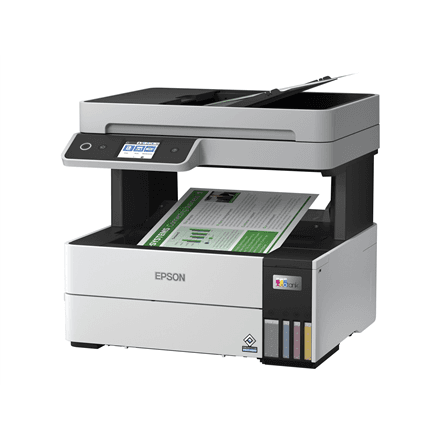
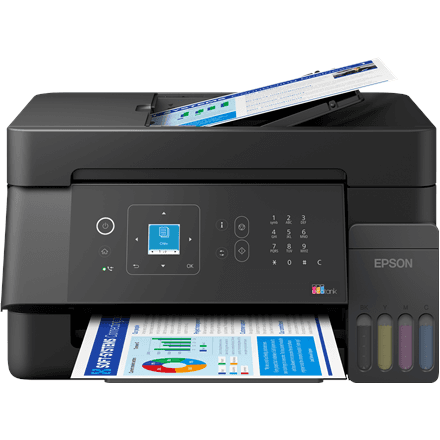
Epson EcoTank L5390 all-in-one printer, colour inkjet, A4, Wi-Fi, fax

The Epson EcoTank L5390 is a colour all-in-one printer that prints, scans and faxes, and connects to your network over Wi-Fi. As is usual for the EcoTank series, the ink is held in tanks built into the printer rather than in cartridges. The maximum size is A4 and the black body weighs 5.5 kg, a good fit for a small office that still needs a fax.

  • Technology: inkjet, EcoTank ink tanks, colour printing
  • Functions: printing, colour scanning, fax
  • Maximum size: A4
  • Two-sided printing: no automatic duplex
  • Connectivity: Wi-Fi
  • Body: black, weight 5.5 kg

Description

A fax for those who still need one

Many public bodies, notaries, clinics and suppliers still send documents by fax. The L5390 is the EcoTank model with a fax function on top of printing and scanning, so there is no need for a separate fax machine on the desk. The L3361 in the same series has no fax, and according to the supplier data the fax is the main difference between the two models.
EcoTank tanks instead of cartridges

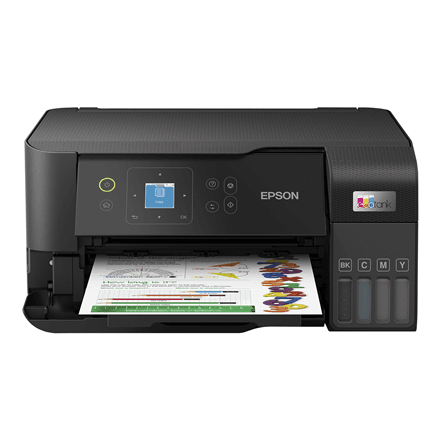
EcoTank is the Epson inkjet series in which the ink is held in tanks built onto the printer and refilled from bottles. There is no small cartridge to replace every so often, and the ink level is visible on the side of the tank. The supplier data does not give the code of the matching ink bottles; it is listed in the printer manual and on the packaging.

Colour scanning for documents

Besides printing and faxing, the L5390 has a colour scanner. A signed contract, an invoice or a copy of an ID card can be scanned and forwarded by email, with coloured stamps and notes preserved. Three functions in one device mean less equipment on the desk, one power cable and one place where all the paperwork comes together.

One Wi-Fi printer for the whole office

Over Wi-Fi the printer joins the office or home network, and every computer on that network can print to it. It can be placed wherever it is least in the way, since there is no cable to run to each desk. The supplier data does not name an app for printing from a smartphone, so none is promised here.

A4 and two-sided printing by hand

The printer prints in colour up to A4, which covers everyday office documents, invoices and presentations. This model has no automatic two-sided printing: for a double-sided document one side is printed first and the paper is then turned over by hand. At low volumes that is easy, but for large double-sided runs it is worth allowing extra time.

Who this all-in-one printer is for

Small offices, accounting firms, medical or dental practices and home offices that need to send the occasional fax but also want colour printing and scanning in a single device. It also suits anyone who prefers ink tanks to small cartridges and wants a printer that can be used over Wi-Fi.

Specifications

General

BrandEpson
Product typeMultifuction Printer
Colour of productBlack
Duplex functionsNo
FaxingYes
Maximum print sizeA4
PrintingColour
ScanningColour
EAN8715946741222

Connectivity

Wi-FiYes

Features

Print technologyInkjet

Dimensions & weight

Net weight5.50 kg

Questions & answers

Does the printer have a fax?

Yes, the L5390 has a fax function in addition to printing and colour scanning.

Does it print on both sides automatically?

No, there is no automatic duplex. For two-sided printing the paper has to be turned over manually.

How does it differ from the L3361?

According to the supplier data, the main difference is the fax: the L5390 has one, the L3361 does not. Both are colour A4 EcoTank printers with Wi-Fi and a scanner.

Does the printer print A3?

No, the largest print size is A4.

Which ink bottles does the printer use?

The supplier data does not give the ink bottle code. The correct code is listed in the printer manual and on the packaging.