Epson

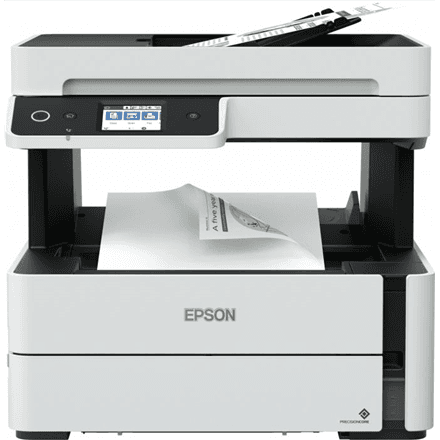
Epson EcoTank M3180 all-in-one printer, mono, A4, fax, Wi-Fi

The Epson EcoTank M3180 is a mono ink tank all-in-one printer that brings printing, scanning, copying and fax together in one grey housing. A speed of 20 ipm, two-sided printing on A4 sheets and a 250-sheet paper tray make it a workhorse for small offices that print black-and-white documents every day.

  • Technology: inkjet with EcoTank ink tanks, mono printing and copying
  • Functions: print, scan (colour), copy, fax (colour)
  • Speed: 20 ipm mono (ISO/IEC 24734)
  • Format and duplex: A4, two-sided printing
  • Connectivity: Wi-Fi, Wi-Fi Direct, wired network, Hi-Speed USB (USB 2.0)
  • Paper: 250-sheet input tray, 100-sheet output tray
  • Scanning: up to 1200 × 2400 dpi

Description

An office document flow on one device

Print an invoice, scan a contract, copy a manual and fax a confirmation: the M3180 handles all of these jobs without four separate machines on the desk. Printing and copying run in black ink, while scanning and fax work in colour. That split matches what a typical office needs: text on paper, every shade in the file.

A pace that keeps queues from forming

Mono print speed under ISO/IEC 24734 is 20 ipm, meaning 20 images per minute on a standard test document. A standardised measurement like this allows printers to be compared fairly. Two-sided printing is available, so longer documents use half the paper, folders stay thinner and the shelves keep more free space.

Less frequent paper and ink top-ups

The 250-sheet input tray takes a whole ream of paper, and the output tray accepts 100 sheets. The printer can therefore run for a long time without anyone adding paper or collecting finished pages. In the EcoTank series ink is poured from a bottle into a built-in tank rather than swapped as a cartridge; which ink bottle this model uses is not stated in the manufacturer data here.

A scanner and fax that see colour

Scanning resolution reaches 1200 × 2400 dpi, which suits both a document archive and the digitising of photos and hand-drawn diagrams. The fax is listed as colour in the manufacturer data, so a colour original can be sent on without losing its shades. Fax is still used by many institutions, clinics and accounting offices.

Wireless and wired connection

Wi-Fi lets every computer and phone on the network print, and Wi-Fi Direct allows printing straight from a smartphone even when there is no router. The interface list also includes a wired network and Hi-Speed USB compatible with the USB 2.0 specification. The grey housing blends in at the office or at home.

Who this all-in-one printer is for

Small offices where one device has to cope with printing, scanning, copying and fax; accounting and insurance offices that print many black-and-white documents; clinics and lawyers for whom fax remains a working tool; and entrepreneurs with a home office who want a roomy tray and two-sided printing. It is also a sensible fit for property managers and small associations that still exchange documents by fax.

Specifications

General

BrandEpson
Product typeAll-in-one
Colour of productGrey
CopyingMono
Duplex functionsYes
FaxingColour
FunctionsPrint, Scan, Copy, Fax
InterfaceWi-Fi Direct, Wired Network, Hi-Speed USB - compatible with USB 2.0 specification
Maximum print sizeA4
PrintingMono
Printing coloursBlack
ScanningColour
EAN8715946655239

Display

Maximum scan resolution1200 x 2400 DPI

Storage

Standard input capacity250 sheets
Standard output capacity100 sheets

Ports

Ethernet LANNo

Connectivity

Wi-FiYes

Performance & capacities

Print speed (ISO/IEC 24734) mono20 ipm

Features

Print technologyInkjet

Dimensions & weight

Net weight7.3 kg

Questions & answers

Is the M3180 suitable for colour printing?

No. Printing and copying are mono, with black listed as the print colour. Scanning and fax are in colour according to the manufacturer.

Can it send faxes?

Yes. Fax is one of the device functions and is listed as colour in the manufacturer data.

Does the printer print on both sides?

Yes, a two-sided printing function is listed in the manufacturer data.

How does the M3180 differ from the M3170?

In the supplier data both models have identical specifications: functions, speed, trays and connectivity are the same. This data does not show what sets the two models apart.

Reviews

No reviews yet

Bought this product? Be the first to share your experience.

Write a review

Only verified buyers can leave reviews.