Epson

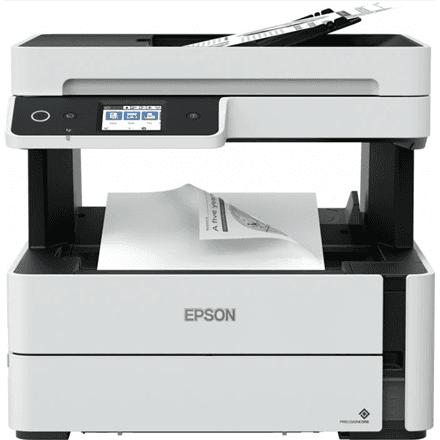
Epson EcoTank M2120 all-in-one printer, mono, A4, Wi-Fi

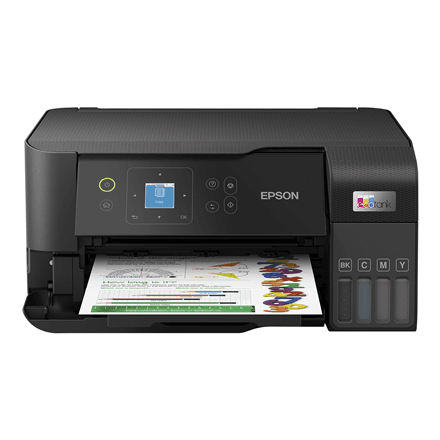
The Epson EcoTank M2120 is a compact mono all-in-one printer for the home and small office that prints, scans and copies. This inkjet is designed mainly for text documents, prints A4 at 15 ipm and connects to a computer or phone over Wi-Fi, Wi-Fi Direct or USB. The scanner, meanwhile, works in colour.

  • Technology: inkjet, mono printing
  • Functions: print, scan, copy
  • Speed: 15 ipm (ISO/IEC 24734)
  • Paper size: up to A4, no two-sided printing
  • Connectivity: USB, Wi-Fi, Wi-Fi Direct
  • Paper: 30-sheet output tray
  • Resolution: print up to 1200 × 600 dpi, colour scanning 1200 × 2400 dpi

Description

A mono printer that does one job well

The M2120 prints with black ink only. If what you print is mostly invoices, contracts, school and work assignments, tickets and other text documents, there is no colour ink to keep stocked or worry about drying out. A print resolution of up to 1200 × 600 dpi gives crisp text and clean tables that stay readable even at small font sizes.

Colour scanner and copies without a computer

Although it prints in mono, the device scans in colour at 1200 × 2400 dpi. Documents, certificates and pictures can be digitised in colour, emailed or saved to a computer. Copying is done straight from the device, so a paper copy is ready even when the computer is switched off or in another room.

Connections without a network cable

The printer joins your home or office Wi-Fi network, and every computer on that network can print to it. Wi-Fi Direct lets a phone or tablet connect directly even without a router, and USB is there for a direct link to a single computer. According to the manufacturer, this model has no Ethernet port and no fax.

Compact and light

The manufacturer describes the M2120 as a compact all-in-one, and it weighs 5 kg, so it fits on a home office desk or shelf and is easy to move around. The output tray holds 30 sheets, enough for everyday short print jobs. The white housing blends in well at home. Without fax, Ethernet or duplex, the device stays simple and its menus have fewer options to wade through.

An ink tank instead of cartridges

EcoTank printers use a built-in ink tank refilled from a bottle instead of swappable cartridges. On a mono model, upkeep is especially simple: only the black ink needs topping up. That suits anyone who prints regularly but does not want to keep swapping cartridges or tracking the levels of several colours.

Who this all-in-one printer is for

Home offices and students who mostly print text; small businesses that need invoices, contracts and reports plus the occasional colour scan; and families who want a small, light device for printing, scanning and copying and have no need for colour prints. When a compact white unit has to fit on a shelf and work over Wi-Fi, it is a sensible choice.

Specifications

General

BrandEpson
Colour of productWhite
CopyingYes
Duplex functionsNo
DVD/CD printingNo
FaxingNo
FunctionsPrint, Scan, Copy
InterfaceUSB, WiFi, Wi-Fi Direct
Maximum print sizeA4
PrintingMono
Printing coloursBlack and White
ScanningColour
EAN8715946671048

Display

Maximum resolutionUp to 1200 x 600 DPI
Maximum scan resolution1200 x 2400 DPI

Storage

Standard output capacity30 sheets

Ports

Ethernet LANNo

Connectivity

Wi-FiYes

Performance & capacities

Print speed (ISO/IEC 24734) mono15 pages/min Monochrome ipm

Features

Print technologyInkjet

Dimensions & weight

Net weight5 kg

Questions & answers

Does this printer print in colour?

No. The M2120 prints in mono only. Scanning, however, is in colour at 1200 × 2400 dpi.

Does it print on both sides of the paper?

No, according to the manufacturer this model has no automatic two-sided printing.

Can I print from my phone?

The printer has Wi-Fi and Wi-Fi Direct, so a phone or tablet can connect through the home network or directly to the printer.

Can it fax or connect to the network by cable?

No. This model has neither fax nor an Ethernet port; it joins the network over Wi-Fi and can also be connected to a computer with a USB cable.

Reviews

No reviews yet

Bought this product? Be the first to share your experience.

Write a review

Only verified buyers can leave reviews.