Epson

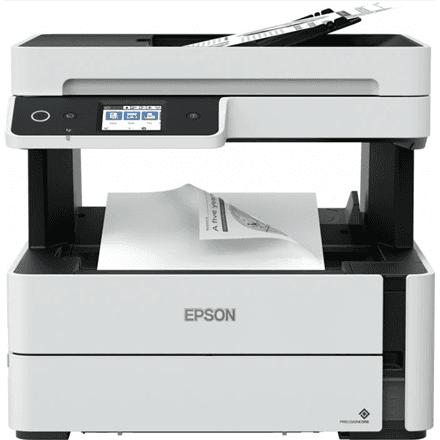
Epson EcoTank L3560 all-in-one printer, colour, A4, Wi-Fi

The Epson EcoTank L3560 is a colour A4 all-in-one printer for the home and small office that prints, scans and copies. Instead of cartridges, this inkjet has ink tanks the manufacturer describes as hassle-free to refill, and it connects to a computer or phone over Wi-Fi, Wi-Fi Direct or USB, with the Epson Smart Panel app.

  • Technology: colour inkjet with ink tanks, 4 colours (black, cyan, yellow, magenta)
  • Functions: print, scan, copy
  • Speed: 15 ipm mono, 8 ipm colour (ISO/IEC 24734)
  • Paper size: up to A4
  • Connectivity: USB, Wi-Fi, Wi-Fi Direct, Epson Smart Panel app
  • Paper: 30-sheet output tray
  • Resolution: print up to 4800 × 1200 dpi, CIS scanner 1200 × 2400 dpi

Description

Ink tanks that cut printing costs

The manufacturer describes printing on the L3560 as ultra-low-cost: by its figures, one set of inks is equivalent to up to 66 cartridges. Instead of cartridges, the printer has ink tanks that are refilled from bottles and, according to Epson, are hassle-free to use. In a household that prints homework, documents and the odd colour picture, consumables need topping up far less often.
Colour printing with crisp text

Mono print resolution at normal quality reaches 4800 × 1200 dpi, so text is crisp and tables are clean. The printer uses four colours, black, cyan, yellow and magenta, which cover text documents as well as colour charts, school project illustrations and simple pictures. Speed under ISO/IEC 24734 is 15 ipm in mono and 8 ipm in colour.

Scanner and copier in one device

A CIS scanner with an optical resolution of 1200 × 2400 dpi scans documents, certificates and photos in colour, ready to be emailed or saved to a computer. Copies are made straight from the device, no computer needed. Two-sided scanning is manual: to scan the back of a sheet, you turn it over yourself.

Wireless connection and Smart Panel

The printer joins your home Wi-Fi network, so every computer in the household can print to it. Wi-Fi Direct lets a phone connect straight to the printer even without a router, and the Epson Smart Panel app lets you print and scan from a smartphone without starting up a computer. A USB cable covers a direct link to a single computer. This model has no Ethernet port and no fax.

A compact printer for the home desk

The L3560 weighs 4.30 kg, so it fits on a desk or shelf and is easy to move when needed. The output tray holds 30 sheets, which suits everyday printing at home and in a small office. The housing is black. A simple design without fax or network cable keeps setup and daily use straightforward, even for people who rarely deal with printers.

Who this all-in-one printer is for

Families who print homework, documents and the occasional colour picture; pupils and students who want to print without worrying about cartridges; and home offices or small businesses that are well served by A4, Wi-Fi and colour scanning and copying in one compact device.

Specifications

General

BrandEpson
Product typeInkjet Multifunctional Printer
Colour of productBlack
Duplex functionsYes
Duplex scanningManual
FaxingNo
FunctionsPrint, Scan, Copy
InterfaceUSB, WiFi, Wi-Fi Direct
Maximum print sizeA4
PrintingColour
Printing coloursBlack, Cyan, Yellow, Magenta
Scanner typeContact image sensor (CIS)
ScanningColour
Wooden1413.00 g
EAN8715946706757

Display

Optical scanning resolution1200 x 2400 DPI
Print resolution (black, normal quality)4800 x 1200 DPI

Storage

Standard output capacity30 sheets

Ports

Ethernet LANNo

Connectivity

Wi-FiYes

Performance & capacities

Print speed (ISO/IEC 24734) colour8 ipm
Print speed (ISO/IEC 24734) mono15 ipm

Features

Print technologyInkjet
Other featuresUltra-low-cost printingUp to 66 cartridges in one set of inksHassle-free ink tank systemEpson Smart Panel app

Dimensions & weight

Net weight4.30 kg

Questions & answers

Can I print from my phone?

Yes. The printer has Wi-Fi and Wi-Fi Direct, and the manufacturer names the Epson Smart Panel app for printing and scanning from a smartphone.

Does it print on both sides of the paper?

The manufacturer lists a duplex function, but two-sided scanning is manual. Automatic two-sided printing is not separately confirmed in the data, so expect that you may need to turn sheets over by hand.

How long does one set of inks last?

The manufacturer compares it with cartridges: by its figures, one set of inks equals up to 66 cartridges. The actual page count depends on what you print.

Can the printer be connected to the network by cable?

No, this model has no Ethernet port. It joins the network over Wi-Fi and can also be connected to a computer with a USB cable.