SYNOLOGY

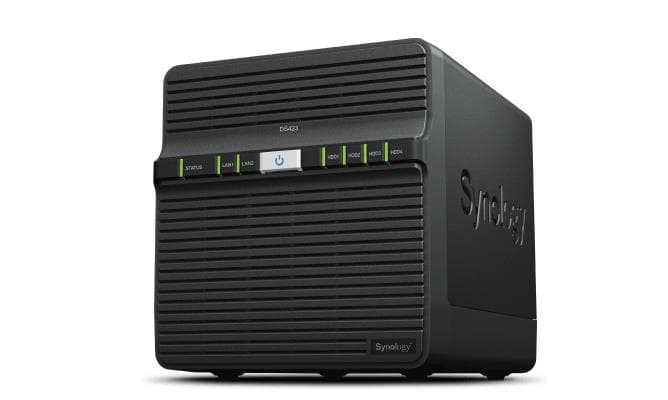
Synology DS423 NAS, 4 bays, Realtek RTD1619B, 2 GB, 2 × 1GbE

The Synology DiskStation DS423 is a four-bay NAS for homes and small offices that brings file sharing, photo management, backup and video surveillance together. Inside are a quad-core Realtek RTD1619B and 2 GB of DDR4 memory, and it connects to your network through two gigabit ports. The DiskStation Manager operating system comes preinstalled.

  • Drive bays: 4 bays 2.5″/3.5″ SATA, HDD and SSD, hot-swap
  • Processor and memory: Realtek RTD1619B, 4 cores, 1.7 GHz; 2 GB DDR4 (2 GB maximum)
  • Network: 2 × 1GbE RJ-45
  • USB: 2 × USB 3.2 Gen 1 Type-A
  • RAID: 0, 1, 5, 6, 10 and JBOD
  • Drives: not included
  • Size and weight: 184 × 168 × 230 mm, 2.21 kg

Description

Four bays and RAID 5 or 6 to protect your data

The four bays take 3.5-inch hard drives and 2.5-inch SSDs, and they are hot-swappable. Four drives open up RAID 5 and RAID 6: the first survives one failed drive, the second two, and both leave more usable capacity than a two-drive mirror. RAID 10 suits those who want speed and protection together, while JBOD lets you use each drive on its own.
A private cloud for the whole family or team

The DS423 gathers files from PCs, Macs, phones and external drives in one place. You can browse, edit and share them through a desktop client, a mobile app or a web browser, and an administrator decides who can see what. On-demand sync keeps only the files you need on your computer, and sync with Google Drive, Dropbox and Microsoft OneDrive is available too.

Snapshots and backups against ransomware

DiskStation Manager uses the Btrfs file system, which guards data against corruption and lets you roll back files changed by mistake or maliciously using snapshots. Snapshot Replication offers recovery points as often as every 5 minutes and restores within seconds. Synology Drive backs up computer folders in real time or on a schedule, and the whole NAS can be backed up licence-free to another server, an external drive or the cloud.

Video surveillance for up to 30 cameras

Up to 30 IP cameras can be connected, chosen from more than 8,300 validated models or ONVIF devices. Streams can be watched live in a browser, on a computer or on a phone, with alerts when suspicious activity is detected. Synology Photos meanwhile organises your photos and albums and uploads pictures from your phone to the NAS automatically.

Ports, power and chassis

There are two gigabit RJ-45 ports and two USB 3.2 Gen 1 ports for external drives. With two 80 mm fans, the manufacturer rates the noise level at 22.9 dB, typical power draw at 32.41 W and 4.97 W in sleep mode. Power comes from an external 90 W adapter. The chassis has a Kensington lock slot, a buzzer and a reset button, weighs 2.21 kg, and ships with power and network cables.

Who this NAS is for

Families and home offices that want photos, documents and backups kept on their own device; small businesses for which gigabit networking is enough and who want RAID 5 or 6 protection; and users who want to record up to 30 security cameras in the same box.

Specifications

General

BrandSYNOLOGY
Model nameDS423
Product colourBlack
TypeNAS
BuzzerYes
System logYes
Device classHome & Home Office
Fan diameter80
Fan diameter 280
Number of fans2
Backup functionYes
Number of users1024
Operating altitude0 - 5000
Built-in FTP serverYes
Access Control List (ACL)Yes
Operating relative humidity (H-H)5 - 95
EAN4711174724918

Display

Built-in displayNo

Processor

Processor manufacturerRealtek
Processor familyRealtek
Processor modelRTD1619B
Processor cores4
Processor frequency1.7 GHz

Memory

Internal memory2 GB
Internal memory typeDDR4

Storage

Storage drive size2.5/3.5
Hot-swap drive baysYes
Storage drives installedNo
Storage temperature (T-T)-20 - 60
Installed storage drive typeNo
Storage drive sizes supported2.5/3.5
Supported storage drive typesHDD & SSD
Storage relative humidity (H-H)5 - 95
Total installed storage capacity0
Maximum supported storage capacity108
Number of storage drives supported4
Supported storage drive interfacesSerial ATA

Audio

Built-in speaker(s)No

Ports

Card reader integratedNo
USB 3.2 Gen 1 (3.1 Gen 1) Type-A ports quantity2
USB portYes
Ethernet LANYes
Ethernet LAN (RJ-45) ports2
Ethernet LAN data rates10/100/1000
Cable lock slotYes
Cable lock slot typeKensington
Copper ethernet cabling technology1000BASE-T/100BASE-T/10BASE-T

Connectivity

Security algorithmsHTTPS/SSH/SSH-1.5/SSH-2/SSL/TLS
Supported network protocolsSMB1 (CIFS), SMB2, SMB3, NFSv3, NFSv4, NFSv4.1, NFS Kerberized sessions, iSCSI, HTTP, HTTPs, FTP, SNMP, LDAP, CalDAV

Software & security

Operating system installedDiskStation Manager

Keyboard & controls

On/off switchYes
Reset buttonYes

Battery & power

Power consumption (typical)32.41 W
AC input voltage100 – 240 V
AC input frequency50 / 60
Power cables quantity1
Power supply locationExternal
External power adapterYes
Power consumption (sleep)4.97
Number of power supply units1
Power supply unit (PSU) capacity90
Redundant power supply (RPS) supportNo

Performance & capacities

Noise level22.9 dB
Operating temperature (T-T)0 – 40 °C
RAID levels0/1/10/5/6/JBOD
Cooling typeActive

Features

Cables includedAC/LAN (RJ-45)
LED indicatorsYes
RAID supportYes
iSCSI supportYes
Backup featuresCloud/iSCSI LUN
Browser supportedGoogle Chrome, Firefox, Microsoft Edge, Safari
Multilingual supportYes
Maximum RAM supported2
Supported file systemsBTRFS/exFAT/ext3/ext4/FAT32/HFS+/NTFS

Dimensions & weight

Width184 mm
Depth168 mm
Height230 mm
Weight2.21 kg
Product Net Weight2.21 kg

Questions & answers

Are drives included?

No, no drives are installed. The four bays accept 3.5″ hard drives and 2.5″ SSDs with a SATA interface.

Can the memory be upgraded?

No. According to the manufacturer, the maximum supported memory is 2 GB, which is already installed. Keep this in mind if you plan to run many apps at the same time.

Which RAID levels are supported?

RAID 0, 1, 5, 6, 10 and JBOD. With four drives, RAID 5 or RAID 6 are the usual choices.

Is the operating system preinstalled?

Yes, the DS423 runs Synology DiskStation Manager, which is already on the device. Drives are installed and configured at first start-up.

Reviews

No reviews yet

Bought this product? Be the first to share your experience.

Write a review

Only verified buyers can leave reviews.