Synology

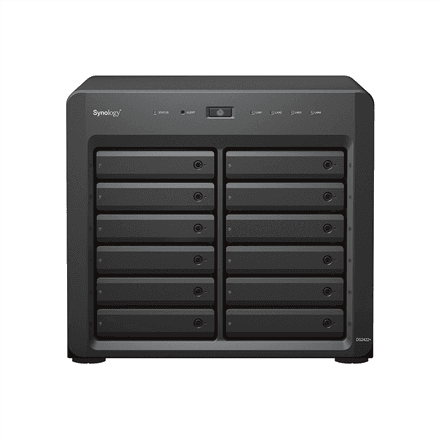
Synology DS2422+ tower NAS, 12 bays, AMD Ryzen V1500B, 4 GB, 4 × 1GbE

The Synology DS2422+ is a tower NAS with 12 drive bays that take both HDDs and SSDs and support hot swapping. Inside are a quad-core AMD Ryzen V1500B processor at 2.2 GHz and 4 GB of DDR4 memory, and it connects to your network through four 1GbE ports. A PCIe slot and an expansion port leave room to grow later on.

  • Drive bays: 12 × 3.5″, HDD/SSD, hot-swap
  • Processor and memory: AMD Ryzen V1500B, 4 cores, 2.2 GHz, 4 GB DDR4
  • Network: 4 × 1GbE RJ-45
  • Expansion: 1 × PCIe slot, 1 × expansion port
  • USB: 2 × USB 3.2
  • RAID and chassis: 0, 1, 5, 6, 10 and Hybrid RAID, tower with two fans, 11.6 kg

Description

Twelve bays without a server cabinet

The DS2422+ offers the capacity of a rackmount unit but stands on a desk or the floor like an ordinary tower PC. All 12 bays are designed for 3.5-inch drives and accept both HDDs and SSDs. Drives are hot-swappable: a failed disk can be pulled out and replaced without switching the NAS off, so your colleagues keep working while the array is repaired in the background.

A quad-core Ryzen for everyday workloads

The AMD Ryzen V1500B is a quad-core, server-class embedded processor running at 2.2 GHz. With 4 GB of DDR4 memory it handles office file sharing, several users working at once and regular backup jobs. If heavier applications come along later, adding memory is worth considering, but the manufacturer data does not state the number of memory slots or the maximum supported amount.

Four network ports to share the load

Four 1GbE RJ-45 ports let you connect the NAS to several networks at once, for example separating office workstations, backup traffic and security cameras, so one stream does not slow down another and a single broken cable does not cut everything off. Two USB 3.2 ports are there for external drives, for example to make a second copy on a backup disk that is kept away from the office.

A PCIe slot and an expansion port for the future

The NAS has one PCIe slot for an add-in card and a separate expansion port for connecting an additional drive enclosure. That means you do not have to replace the whole unit when your data or your network speed needs grow. The exact cards and expansion units that are supported are not listed in the manufacturer data, so pick them from the Synology compatibility list.

RAID levels that protect your data

RAID 0, 1, 5, 6, 10 and Hybrid RAID are supported. In a twelve-drive array RAID 6 is a sensible choice, because your data survives even if two drives fail at the same time. Hybrid RAID lets you mix drives of different sizes and grow capacity step by step. Two fans keep a fully loaded chassis cool, and the unit weighs 11.6 kg.

Who this NAS is for

Small and mid-sized businesses that need plenty of disk space but have no server cabinet; photographers, video producers and design studios whose archives grow by terabytes; and IT administrators who want hot-swap bays, four network ports and a PCIe slot that lets the system grow later.

Specifications

General

BrandSynology
Chassis typeTower
Interface4x1GbE, 2xUSB 3.2, 1xPCIe, 1xExpansion Port
Internal RAM4 GB
Number of 3.5" bays12
EAN4711174723980

Processor

Processor familyAMD Ryzen
Processor modelRyzen V1500B Quad Core
Processor frequency2.2 GHz

Memory

Internal memory typeDDR4

Storage

Drive bays12
Number of storage drives supportedUp to 12 HDD/SSD Hot-Swap

Ports

Ethernet LAN (RJ-45) ports4

Performance & capacities

RAID levelsRAID 0,1,5,6,10,Hybrid

Features

Other featuresDual Fan

Dimensions & weight

Net weight11.6 kg

Questions & answers

Are drives included?

The manufacturer data does not mention any installed drives, so drives are chosen separately. There are 12 bays and they accept both HDDs and SSDs.

Can I replace a drive without turning the NAS off?

Yes, all 12 bays are hot-swappable. A failed drive can be swapped while the system runs, and the RAID array rebuilds onto the new disk.

Can the NAS be expanded later?

It has one PCIe slot and one expansion port. Supported cards and expansion units are listed in the Synology compatibility list.

Does the DS2422+ need a server rack?

No, it is a tower model that stands on a desk or on the floor. Synology's RackStation models are the ones built for rack mounting.

Reviews

No reviews yet

Bought this product? Be the first to share your experience.

Write a review

Only verified buyers can leave reviews.