Dell

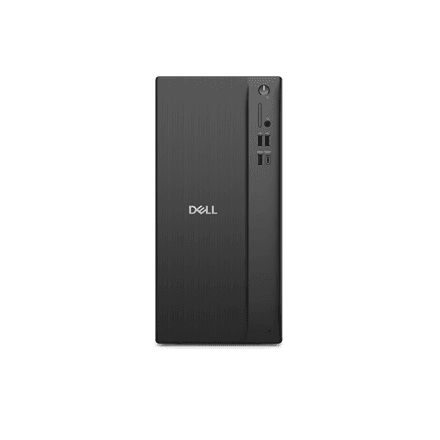
Dell Pro Tower Essential Ryzen 5 230 16GB 512GB Win11 Pro Desktop PC

The Dell Pro Tower Essential is a business desktop PC built around an AMD Ryzen 5 230 processor, 16GB of RAM and 512GB of storage, with Windows 11 Pro preinstalled. It is a compact tower for offices and home workspaces that need a dependable everyday computer that is ready to set up and use.

  • Processor: AMD Ryzen 5 230
  • Memory: 16GB RAM
  • Storage: 512GB
  • Graphics: Integrated graphics
  • Operating system: Windows 11 Pro
  • Keyboard: Not included
  • Net weight: 4.16 kg

Description

AMD Ryzen 5 230 Processor for Everyday Business Work

The tower runs on an AMD Ryzen 5 230, a processor from AMD's mainstream Ryzen 5 family. It is designed for typical office work: email, web browsing, video calls, spreadsheets and document editing. Running several applications side by side should be routine for this configuration, so it suits staff who keep many browser tabs, chat tools and office files open throughout the working day.

16GB of RAM for Smooth Multitasking

With 16GB of memory, the Dell Pro Tower Essential has enough headroom for modern operating systems and the applications most people rely on at work. More memory means less slowdown when you switch between programs or keep large documents and online collaboration tools open together. For standard office desktops, 16GB is a sensible amount that helps the system stay responsive as software demands grow.

512GB Storage for Files and Applications

The 512GB of built-in storage provides room for the operating system, business software and a sizeable library of documents, presentations and media. That is ample for most office users, particularly where files are also kept on network drives or in cloud services. The manufacturer does not specify the storage type in the listed details, so check the full product documentation if that matters for your deployment.

Integrated Graphics for Office Displays

This configuration uses integrated graphics rather than a separate graphics card. Integrated graphics handle office applications, web content, video playback and video conferencing, and they keep power use and heat low. The setup suits productivity work rather than demanding 3D tasks or modern games, so creative professionals and gamers should look at configurations with dedicated graphics.

Windows 11 Pro for Business Management

Windows 11 Pro comes preinstalled, giving businesses features aimed at professional use, such as domain joining, BitLocker encryption and centralised device management. IT teams can add the PC to existing company networks and policies without upgrading the operating system first. The desktop also contains an embedded rechargeable battery, which typically keeps system settings and the clock when the computer is unplugged.

Compact Tower Design Without Bundled Keyboard

The Dell Pro Tower Essential has a net weight of 4.16 kg, so it is easy to move between desks or install under a workstation. It ships without a keyboard, letting you use peripherals you already own or pick a keyboard with the layout you prefer, whether Estonian, English or another. This is practical for companies that standardise on their own keyboards and mice.

Who This Desktop Suits

This tower is aimed at small and medium-sized businesses, offices, schools and home workers who need a reliable Windows 11 Pro computer for productivity. It fits well into fleet rollouts where identical machines are deployed across many desks. Users with heavy graphics, video editing or gaming needs will find integrated graphics limiting and should consider a more powerful configuration.

Specifications

BrandDell
Net weight4.16 kg
EAN2000001440803

Questions & answers

Does the Dell Pro Tower Essential come with a keyboard?

No, this configuration does not include a keyboard, so you can connect one with the layout you prefer.

Which operating system is installed?

The computer comes with Windows 11 Pro preinstalled.

Is this desktop suitable for gaming?

It uses integrated graphics, which are intended for office work and media playback rather than demanding games.

Can I upgrade the RAM or storage?

The manufacturer does not list memory slot or drive bay details in the provided specifications, so upgrade options cannot be confirmed here.

Which ports does it have?

The port selection is not listed in the available specifications; please refer to Dell's official documentation for the full connectivity details.