Black Friday is on — deals until 30 NovemberSee the deals
AOC

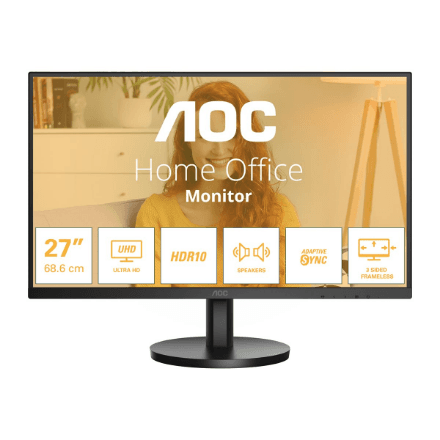
AOC U27B3A monitor 27" 4K UHD IPS 60 Hz

The AOC U27B3A is a 27-inch 4K UHD monitor for office work, photo viewing and everyday use. Its IPS panel with 3840 × 2160 resolution renders text and detail sharply, the anti-glare surface cuts reflections, and two HDMI ports plus DisplayPort let you connect several devices.

  • Display: 27″, 3840 × 2160 (4K UHD), 16:9
  • Panel: IPS, 60 Hz, 4 ms, 178° viewing angles
  • Brightness: 350 cd/m², anti-glare surface
  • Ports: 2 × HDMI, 1 × DisplayPort
  • Mounting: tilt, VESA 100 × 100 mm, built-in speakers

Description

4K sharpness that makes text and photos clear

On a 27-inch screen, 3840 × 2160 pixels make for a very dense image: letters look smooth, photos reveal fine detail, and Windows scaling lets you choose between larger text and more workspace. The IPS panel keeps colours consistent at an angle, so the picture does not shift when two people look at the screen together. A 60 Hz refresh rate is standard for an office and multimedia monitor.

Who this monitor is for

Office workers and accountants who spend the day in spreadsheets and documents; hobby photographers who want to see their shots in full detail; and home users who keep a PC and a media player or console connected at once. If height adjustment matters at your desk, the VESA mount lets you put the monitor on a separate arm.

Specifications

General

BrandAOC
Height adjustmentNo
Tilt adjustmentYes
VESA mountingYes
VESA mounting interfaces100x100 mm
Viewing angle, horizontal178 °
Viewing angle, vertical178 °
EAN4038986181495

Display

Display diagonal27 "
Display3840 x 2160 pixels
HD typeUHD
Panel typeIPS
Maximum refresh rate60 Hz
Response time4 ms
Display brightness350 cd/m²
Display surfaceAnti-Glare
Aspect ratio16:9
TV tuner integratedNo

Audio

Built-in speaker(s)Yes

Ports

Ethernet LAN (RJ-45) portsNo
HDMI ports quantity2
DisplayPorts quantity1
USB-CNo

Dimensions & weight

Net weight4.04 kg

Questions & answers

Is the height adjustable?

No, the included stand only tilts. For height adjustment, use a monitor arm with a VESA 100 × 100 mm mount.

Is it suitable for gaming?

60 Hz and 4 ms are fine for slower-paced games and consoles. Fast competitive games are better served by gaming monitors with a higher refresh rate.

Can I connect a laptop over USB-C?

This monitor has no USB-C port. Connect a laptop via HDMI or DisplayPort, using an adapter if needed.