Black Friday is on — deals until 30 NovemberSee the deals
Dell

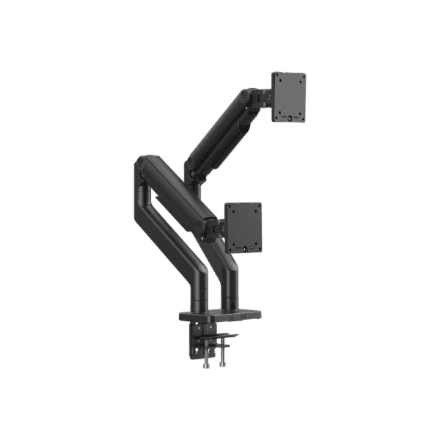
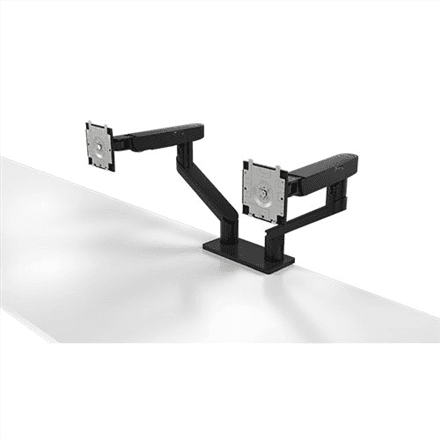
Dell MDA20 dual monitor mount 19–27″, VESA 100 × 100, up to 10 kg

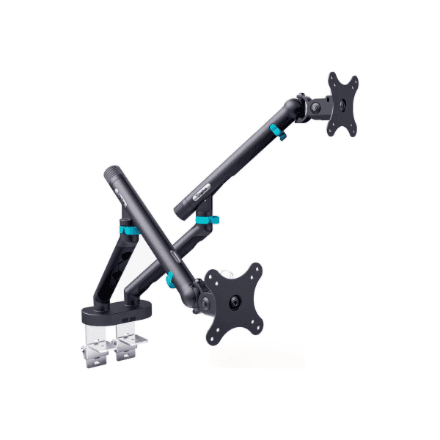
The Dell MDA20 is a desk-mounted monitor mount for two screens from 19 to 27″. Its two arms lift the monitors off the desk, free up the work surface and let you adjust the height, tilt, swivel, rotation and depth of each screen so your neck and eyes stay comfortable. The screens attach using the VESA 100 × 100 mm standard.

  • VESA: 100 × 100 mm
  • Load capacity: up to 10 kg
  • Screen size: 19–27″
  • Arms: 2 (Dual Monitor Arm)
  • Adjustments: height (266 mm), tilt −35…+80°, swivel 180°, rotation −90…+90°, depth
  • Mounting: desk mount
  • Colour: black

Description

Two screens in the air, a clear desk below

The MDA20 is a dual-arm Dell monitor mount: each arm carries its own monitor, and the original stands go back in the box. Only the mount base stays on the desk, leaving more room for the keyboard, laptop, paperwork and docking station. A desk without monitor feet is easier to clean and looks tidier – especially in an open-plan office where many desks stand side by side.
Height adjustment across 266 mm

The height adjustment range is 266 mm. That matters because the top edge of the screen should sit roughly at eye level – then you do not have to tilt your head or hunch your shoulders. On a sit-stand desk, or at a workplace shared by people of different heights, the monitors can be set to the right height in a couple of moves, without stacking books or risers underneath.

Tilt and swivel against glare and for sharing

Each screen tilts from −35 to +80° and swivels through 180°. Tilting helps you get rid of reflections from windows and ceiling lights and keeps the screen square to your line of sight. With the swivel, you can turn a monitor towards a colleague or client in a second to show them something, then turn it back without moving the whole mount.

Portrait mode for code and documents

The rotation range is −90 to +90°, so either screen can be turned to portrait. In portrait mode a long document, source code or web page fits on screen in one piece and you scroll far less. A popular setup is one screen in landscape for the main task and the other in portrait for email, chat or reference material. The screens are also adjustable in depth, so you can pull them closer or push them back.

Which monitors fit: VESA, size and weight

The mount suits 19 to 27-inch monitors with VESA 100 × 100 mm mounting holes on the back. The manufacturer states a maximum load capacity of 10 kg. Before installing, check your monitor specifications for the VESA pattern and its weight without the stand – most office monitors have a 100 × 100 mm mount, but some slim design models lack one entirely.

Who this monitor mount is for

Office workers and accountants who use two screens and want them at the same height and in one line; developers and analysts who keep the second screen in portrait; companies fitting out workstations with one consistent ergonomic solution; and anyone whose desk is crowded by monitor stands and who wants to set the screens to their posture rather than to a fixed stand height.

Specifications

General

BrandDell
Colour of productBlack
VESA mountingYes
FunctionsHeight, tilt, swivel, rotation, depth
Height adjustment range266 mm
PlacementDesk Mount
Product nameMDA20
Swivel angle180 °
Tilt angle-35/80 °
Turn angle-90/90 °
VESA mounting interfaces100 x 100 mm
EAN2000001116289

Display

Maximum screen size compatibility27 "
Screen size compatibility19-27 "

Performance & capacities

Maximum weight (capacity)10 kg

Dimensions & weight

Net weight9.2 kg

Questions & answers

Will my monitor fit this mount?

It will if the monitor is 19–27″, has VESA 100 × 100 mm holes on the back and its weight stays within the load capacity (up to 10 kg according to the manufacturer). Use the monitor weight without its stand.

Can I mount a 32-inch monitor?

The manufacturer lists 27″ as the largest supported screen size, so a bigger monitor needs a different mount.

Can the screen be rotated to portrait?

Yes, the rotation range is −90 to +90°, so either monitor can be turned to portrait and back.

How thick a desk can the mount be fitted to?

The manufacturer does not specify the desk thickness or the fixing method (clamp or grommet). Check this in the Dell installation guide before fitting.

Reviews

No reviews yet

Bought this product? Be the first to share your experience.

Write a review

Only verified buyers can leave reviews.