Black Friday is on — deals until 30 NovemberSee the deals
Dell

Dell Pro Essential QVT1260 Tower desktop computer Core Ultra 5 225 16/512 GB

The Dell Pro Essential QVT1260 is a business desktop computer in a upright Tower chassis for offices, front desks and home offices. Inside are a 10-core Intel Core Ultra 5 225 processor, 16 GB of DDR5 memory and a 512 GB SSD, running Windows 11 Pro. Wi-Fi 6 is built in, so the computer can join the network even where a cable does not reach.

  • Processor: Intel Core Ultra 5 225, 10 cores, up to 4.9 GHz
  • Memory and storage: 16 GB DDR5 5600 MHz + 512 GB SSD
  • Graphics: integrated Intel UHD Graphics
  • Connectivity: Wi-Fi 6 (802.11ax)
  • System: Windows 11 Pro
  • Chassis: Tower, black; no keyboard included

Description

Core Ultra 5 225: a newer platform with ten cores

The Intel Core Ultra 5 225 belongs to Intel's newer Core Ultra family and has 10 cores, with boost up to 4.9 GHz. In daily work that means smooth switching between the browser, Office, business applications and video calls, even with many windows open. The newer platform pairs with faster DDR5 memory and gives the computer headroom if it is meant to stay in service for several years.

Memory and SSD without the waiting

16 GB of DDR5 memory at 5600 MHz is a sensible amount for modern office work: a browser, email, Teams and several large spreadsheets fit in memory at the same time. The 512 GB SSD holds the system, programs and working files when most data lives in the cloud or on a network drive. Solid-state storage boots Windows and launches programs in seconds, and files open without the delays familiar from old hard drives.

Integrated graphics for office work

The picture comes from the Intel UHD Graphics integrated into the processor; there is no separate graphics card in this configuration. Office work does not need one: documents, spreadsheets, web apps, video calls and full-screen video run on integrated graphics without trouble, and light photo editing is fine too. 3D modelling, video editing and gaming call for computers with a discrete graphics card, such as Dell Precision workstations.

A Tower chassis that sits firmly under the desk

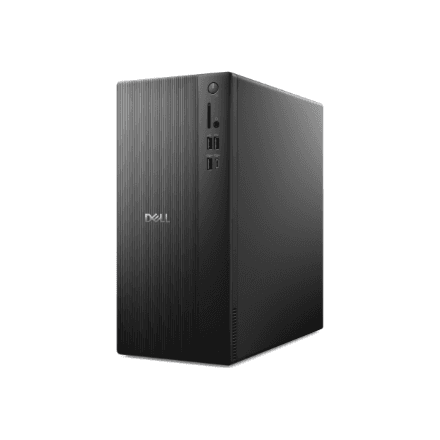
The Tower is a classic upright case that usually goes under or beside the desk, leaving the desktop free for the monitor and paperwork. A larger case gives components more room and makes servicing easier than with a very compact computer. The case is black and plain in appearance. Exact dimensions and a port list are not in the manufacturer data; they can be found in Dell's technical specifications.

Windows 11 Pro and Wi-Fi 6 for the company network

Windows 11 Pro is the business edition of Windows: BitLocker drive encryption, joining a domain or Microsoft Entra ID, and group policies are available out of the box. That makes it easier for IT to set up computers the same way and manage them remotely. Wireless networking is Wi-Fi 6 (802.11ax), which also works with older routers. The manufacturer data says nothing specific about a wired network connection.

Who this desktop computer is for

Offices and home offices where the computer lives under the desk and the desktop stays clear; accountants, administrators and sales staff whose day is spent in documents, spreadsheets, CRM and video calls; schools and libraries that need several identical workstations; and IT departments that prefer a simple tower that is easy to service.

Specifications

General

BrandDell
TypeDesktop
Colour of productBlack
Chassis typeTower
EAN2000001437537

Processor

Processor familyIntel Core Ultra 5
Processor model225
Processor cores10
Processor boost clock speed4.9 MHz

Memory

Internal memory16 GB
Internal memory typeDDR5
Memory clock speed5600 MHz

Storage

Storage mediaSSD
Storage drive capacity512 GB

Graphics

On-board graphics adapter modelIntel UHD Graphics

Connectivity

Wi-FiYes
Wi-Fi standards802.11ax

Software & security

Operating system installedWindows 11 Pro

Keyboard & controls

Keyboard languageNo keyboard

Dimensions & weight

Net weight4.16 kg

Questions & answers

Are a keyboard and mouse included?

No keyboard is included; the manufacturer lists it as No keyboard. The data says nothing about a mouse, so plan to choose input devices separately. Any USB keyboard and mouse, or a wireless set with its own receiver, will work.

Does it have Wi-Fi and Bluetooth?

Wi-Fi is built in, to the 802.11ax standard, also known as Wi-Fi 6. Bluetooth is not listed in the manufacturer data, so if you use Bluetooth headphones or a mouse, check this first or use a USB adapter.

How many monitors can I connect?

The manufacturer does not specify the number or type of video outputs. The integrated Intel UHD Graphics supports multiple displays, but the exact number depends on the rear panel ports, which are listed in Dell's technical specifications.

Can the memory and storage be upgraded?

The computer has 16 GB of DDR5 memory and a 512 GB SSD. The manufacturer does not specify the number of memory slots or extra drive bays, so check the Dell service manual before planning an upgrade.

Is Windows installed?

Yes, Windows 11 Pro is already installed, so after the first start-up all that is left is to set up an account and download updates.