Epson

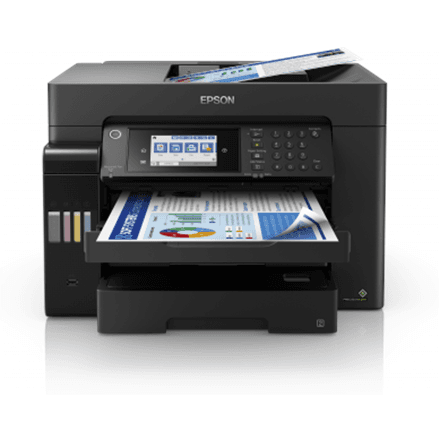
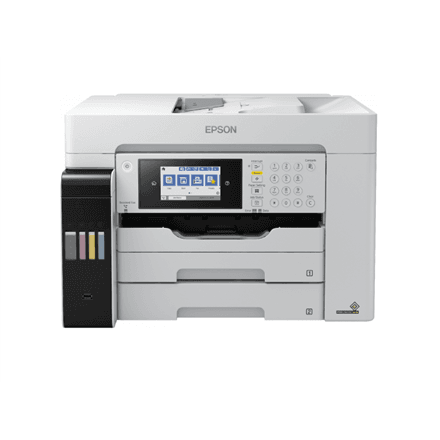
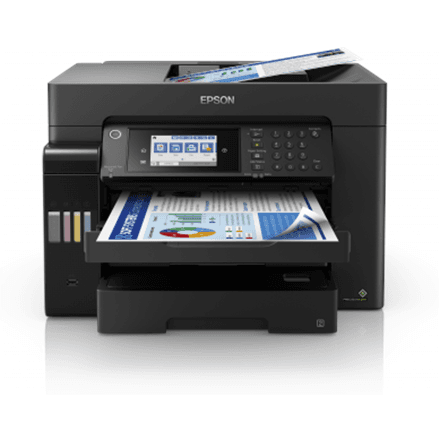
Epson EcoTank L15180 all-in-one printer A3+, colour, fax, A3 duplex

The Epson EcoTank L15180 is an A3+ colour all-in-one printer that prints, scans, copies and faxes. Automatic two-sided printing on this inkjet works with both A4 and A3 paper, speed is 25 ipm in mono and colour alike, and it joins the office network over Ethernet or Wi-Fi.

  • Technology: colour inkjet, 4 colours (black, cyan, yellow, magenta)
  • Functions: print, scan, copy, fax (4-in-1)
  • Speed: 25 ipm mono and 25 ipm colour (ISO/IEC 24734)
  • Paper size and duplex: up to A3+, automatic duplex on A4 and A3 plain paper
  • Connectivity: Wi-Fi, USB, Ethernet
  • Paper: 125-sheet output tray
  • Resolution: print up to 4800 × 1200 dpi, CIS scanner 1200 × 1200 dpi

Description

Automatic duplex, even on A3

Many printers can only print both sides automatically on A4. According to the manufacturer, the L15180 does it on A3 plain paper too, so large two-sided brochures, leaflets, handouts and drawing sets come out without anyone flipping sheets by hand. That saves paper and time, and avoids the mistakes that happen when a stack goes back into the printer the wrong way round.
The same speed in colour and mono

Print speed under ISO/IEC 24734 is 25 ipm in both mono and colour. The standard measures speed with ordinary office documents, so the figure reflects everyday work. In an office that alternates between text and colour charts, there is no waiting after the colour pages, and the printer keeps up with several users.

Sharp prints and an accurate scanner

Mono print resolution at normal quality reaches 4800 × 1200 dpi, giving crisp characters and fine lines even on drawings. The scanner uses a CIS (contact image sensor) with an optical resolution of 1200 × 1200 dpi, a slim and energy-efficient design that is well suited to scanning documents and making copies. Fax is included too, so the device covers all four core office functions.

Four ink tanks for high volumes

The printer uses four colours: black, cyan, yellow and magenta. EcoTank printers rely on ink tanks refilled from bottles rather than cartridges, so consumables need topping up less often than on a cartridge printer. The manufacturer lists the housing colour as black and white, which has no bearing on its colour printing.

A large machine for a permanent spot

The printer measures 515 × 500 × 521 mm and weighs 21.5 kg, so it is worth planning a dedicated desk or stand for it. The output tray holds 125 sheets. Wi-Fi and Ethernet let you place it wherever there is room, every computer in the office can print to it over the network, and USB covers a direct connection.

Who this all-in-one printer is for

Offices and studios that print two-sided A3 material such as leaflets, brochures or drawing sets; schools and organisations that produce their own printed matter; and teams that need one shared network device for printing, scanning, copying and fax at the same speed in colour and mono.

Specifications

General

BrandEpson
Product type4-in-1
Colour of productBlack and white
Duplex functionsYes
FaxingYes
FunctionsPrint, Scan, Copy, Fax
InterfaceWiFi, USB, Ethernet
Maximum ISO A-series paper sizeA3+
Media typeAutomatic duplex (A4/A3, plain paper)
Number of print cartridges4
PrintingColour
Printing coloursBlack, Cyan, Yellow, Magenta
Scanner typeContact image sensor (CIS)
Wooden1413.00 g
EAN8715946690339

Display

Optical scanning resolution1200 x 1200 DPI
Print resolution (black, normal quality)4800 x 1200 DPI

Storage

Standard output capacity125 sheets

Ports

Ethernet LANYes

Connectivity

Wi-FiYes

Performance & capacities

Print speed (ISO/IEC 24734) colour25 ipm
Print speed (ISO/IEC 24734) mono25 ipm

Features

Print technologyInkjet

Dimensions & weight

Net weight21.5 kg
Dimensions (WxDxH)515 x 500 x 521 mm

Questions & answers

Does it print both sides automatically on A3?

Yes. According to the manufacturer, the L15180 supports automatic two-sided printing on A4 and A3 plain paper.

Does it print in colour if the housing is black and white?

Yes, it does. Black and white is the colour of the housing; the printer uses four inks: black, cyan, yellow and magenta.

Can the printer join the office network?

Yes, with an Ethernet cable or over Wi-Fi. USB is also available for a direct connection to a computer.

How much space does the printer need?

It measures 515 × 500 × 521 mm (width × depth × height) and weighs 21.5 kg. Allow extra room for loading paper and for the output tray.