Black Friday is on — deals until 30 NovemberSee the deals
Logilink

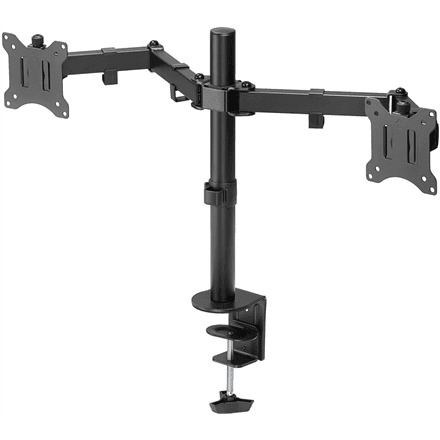
Logilink BP0099 dual monitor desk mount 17–32″, height adjustable, 8 kg

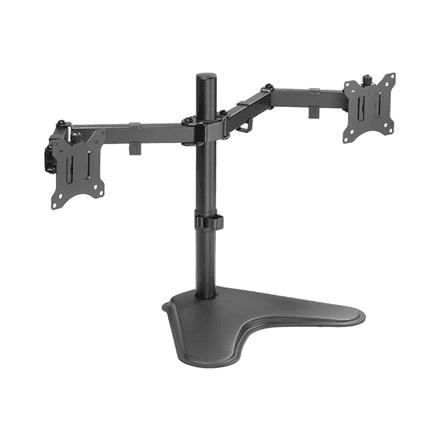
The Logilink BP0099 is a desk mount from the Dual Monitor Stand series, designed for 17–32″ screens. The monitors can be tilted, swivelled, rotated and raised or lowered, with a height adjustment range of 390 mm.

  • Series: Dual Monitor Stand (two-monitor mount)
  • VESA: 75 × 75 and 100 × 100 mm
  • Maximum load: 8 kg
  • Screen size: 17–32″
  • Adjustment: tilt −45° to +45°, swivel −90° to +90°, rotation −180° to +180°, height over a 390 mm range
  • Colour and weight: black, 3.77 kg

Description

Height adjustment that brings the screen to eye level

Besides tilt and swivel, this mount lets you change the screen height over a 390 mm range. With the top edge of the monitor at eye level you do not have to bend your neck, and your shoulders stay relaxed. The screen rotates from −180° to +180°, so one of the monitors can be used in portrait, for example for long spreadsheets or code.
Who this monitor mount is for

It suits a workstation with two 17–32″ monitors that have VESA 75 × 75 or 100 × 100 mm holes on the back. Because the height is adjustable, it works well at a desk shared by several people or where you change your sitting position during the day.

Specifications

General

BrandLogilink
Colour of productBlack
VESA mountingYes
FunctionsTilt, swivel, level adjustment, rotate
Height adjustment range390 mm
PlacementDesk Mount
Swivel angle-90/90 °
Tilt angle-45/45 °
VESA mounting interfaces75 x 75, 100 x 100 mm
EAN4052792060034

Display

Maximum screen size compatibility32 "
Screen size compatibility17-32 "

Performance & capacities

Maximum weight (capacity)8 kg
Rotation-180/180 °

Features

Mounting interface compatibility (max)100 x 100 mm
Mounting interface compatibility (min)75 x 75 mm

Dimensions & weight

Net weight3.77 kg

Questions & answers

Is the 8 kg limit per arm or in total?

The manufacturer only states a maximum load of 8 kg and does not say whether it applies to one arm or to the whole mount. To be safe, choose monitors whose weight stays clearly within that limit.

Can I use monitors smaller than 17 inches?

The manufacturer lists a screen size range of 17–32″. Smaller screens fall outside that range.

How do I check whether my monitor has a VESA mount?

Look at the back of the monitor for four threaded holes at the corners of a square. If they are 75 × 75 or 100 × 100 mm apart, the monitor will fit this mount.