Black Friday is on — deals until 30 NovemberSee the deals
TP-LINK

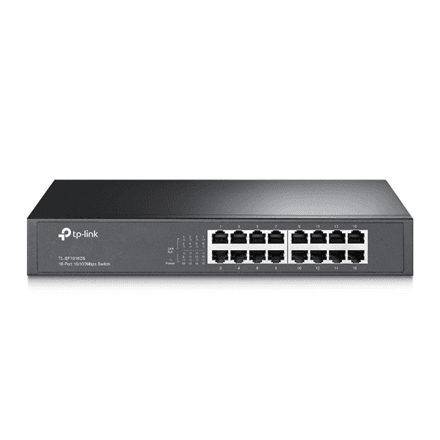
TP-Link TL-SF1016DS 16-port network switch 16 × 100M, desktop or rack, steel case

The TP-Link TL-SF1016DS is a 16-port unmanaged network switch in a steel case that can sit on a desk or go into a rack. Its sixteen 10/100 Mbps ports connect computers, printers and other network devices without any configuration at all.

  • Ports: 16 × RJ-45 10/100 Mbps, no PoE
  • Management: unmanaged, MAC address self-learning, auto MDI/MDIX
  • Mounting: desktop or rack
  • Case: steel
  • Power and weight: external power adapter, 1.392 kg

Description

Two ways to install it in one chassis

If there is no server cabinet, the TL-SF1016DS simply stands on a desk or shelf. When the network grows and a rack appears, the same switch can move into it – no new hardware needed. The steel case copes with office and warehouse conditions better than plastic, while MAC address self-learning and auto MDI/MDIX keep everything working with ordinary network cables.
Who this network switch is for

Small offices and retail floors that need to connect up to 16 devices: desktop computers, network printers, IP phones or tills. It also suits homes and classrooms where the switch starts on a desk but may later move into a server cabinet.

Specifications

General

BrandTP-LINK
Case designSteel case
Form factorDesktop/Rackmountable
EAN1210002616454

Ports

10/100 Mbps (RJ-45) ports quantity16
Predominant port type10/100 Mbps (RJ-45)

Connectivity

POENo

Keyboard & controls

Switch typeUnmanaged

Battery & power

Power supply typeExternal

Features

Other featuresSupports MAC address self-learning and auto MDI/MDIX

Dimensions & weight

Net weight1.392 kg

Questions & answers

How does it differ from the TL-SF1016?

Both have 16 ports at 10/100 Mbps and an external power supply. The TL-SF1016DS has a steel case and works on a desk or in a rack, while the TL-SF1016 chassis is designed for rack mounting.

Does the switch need to be configured?

No. It is an unmanaged switch with no web interface: connect power and cables and it starts working.

Can it power IP cameras?

No, this model has no PoE. Cameras will need their own power adapter or a PoE switch.