Brother

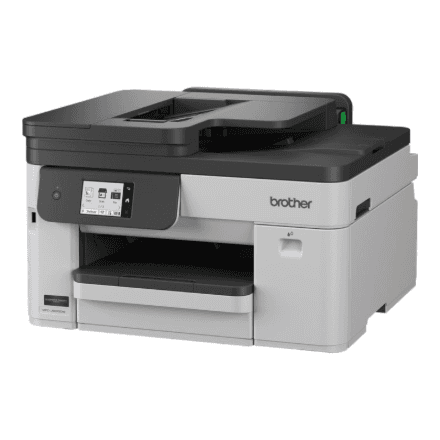
Brother MFC-J5010DW A3 Wi-Fi Inkjet All-in-One Printer

The Brother MFC-J5010DW is an all-in-one inkjet printer that handles documents up to A3 size and connects to your network over Wi-Fi. It brings several office tasks together in one compact multifunction printer, making it a practical option for home offices and small teams who regularly need large-format prints.

  • Printer type: All-in-one (multifunction) inkjet printer
  • Maximum paper format: A3
  • Connectivity: Wi-Fi
  • Weight: 13.90 kg
  • Power: Mains-powered, no built-in battery
  • Brand: Brother

Description

A3 Printing for Larger Layouts

The main reason to choose the MFC-J5010DW over a standard office printer is its support for A3 paper. This format is twice the size of A4, so spreadsheets, floor plans, posters, presentation handouts and design proofs can be printed at a size that stays easy to read. You don't need to scale content down or tile it across several A4 sheets, which saves time when preparing materials for meetings or clients.

Inkjet Technology for Everyday Documents and Graphics

As an inkjet printer, the MFC-J5010DW applies ink directly to the page, a method widely used for both text and colour graphics. Inkjet printers typically warm up quickly and work well for mixed workloads, from simple letters to illustrated reports. Brother does not list print speed, resolution or ink cartridge yields in the specifications provided here, so check the manufacturer's documentation if these figures are important to you.

All-in-One Design That Saves Desk Space

A multifunction printer combines several office functions in a single unit, so you don't need to find room for separate devices. The MFC-J5010DW belongs to Brother's MFC range of all-in-one machines and is designed to be the central document hub on a desk or in a small office. Using one device also means you only have one set of consumables and one machine to set up and maintain.

Wi-Fi Connectivity for Cable-Free Printing

Built-in Wi-Fi lets you place the printer wherever it suits your workspace, rather than next to a particular computer. Once it is connected to your wireless network, several users can send jobs to it without plugging in cables. This is especially convenient in shared home offices or small teams where laptops move between rooms. Other connection options are not listed in the specifications provided.

Solid Build at 13.90 kg

The printer weighs 13.90 kg, which is typical for a machine built to handle A3 paper. That weight helps it stay stable on a desk or cabinet during printing. The unit has no built-in battery and runs on mains power, so it is designed to stay in one permanent spot rather than be carried around. Plan for a sturdy surface with enough room around it for loading A3 sheets.

Who the Brother MFC-J5010DW Suits

This all-in-one printer is well suited to home offices, freelancers, architects, designers, teachers and small businesses who regularly need documents larger than A4. If your work involves wide spreadsheets, technical drawings or marketing materials, A3 support combined with wireless networking keeps things flexible. Users who only print the occasional A4 page may find a smaller printer is enough for their needs.

Specifications

BrandBrother
Net weight13.90 kg
EAN4977766848893

Questions & answers

Can the Brother MFC-J5010DW print on A3 paper?

Yes. The printer supports paper up to A3, so it can also handle smaller formats such as A4.

Does this printer work over Wi-Fi?

Yes, it has built-in Wi-Fi and can connect to your wireless network for cable-free printing.

Is it a laser or an inkjet printer?

It is an inkjet printer that uses ink rather than toner.

What is the print speed and resolution?

The manufacturer does not list print speed or resolution in the specifications provided here.

How heavy is the printer?

The Brother MFC-J5010DW weighs 13.90 kg. It runs on mains power and has no built-in battery.

Reviews

No reviews yet

Bought this product? Be the first to share your experience.

Write a review

Only verified buyers can leave reviews.