Black Friday is on — deals until 30 NovemberSee the deals
Brother

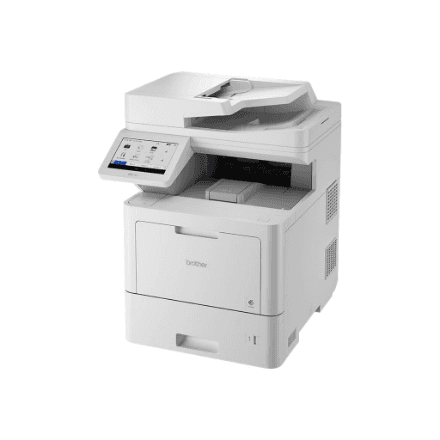
Brother MFC-L9630CDN Colour Laser Multifunction Printer, A4, Wi-Fi, Fax

The Brother MFC-L9630CDN is a colour laser multifunction printer that prints, scans, copies and faxes in A4 format. It prints colour pages at up to 40 ipm and includes automatic duplex, a touchscreen and Wi-Fi, making it a practical all-in-one printer for busy offices.

  • Display: 17.6 cm touchscreen
  • Functions: print, scan, copy, fax
  • Print speed: 40 ipm in colour (ISO/IEC 24734)
  • Resolution: up to 2400 x 600 DPI print, 600 x 600 DPI scan
  • Connectivity: Wi-Fi, Ethernet, Hi-Speed USB 2.0
  • Duplex: automatic two-sided printing
  • Paper size: A4 maximum

Description

Colour laser printing at 40 ipm

This printer uses laser technology and produces colour pages at 40 images per minute, measured to ISO/IEC 24734. The maximum print resolution is 2400 x 600 DPI. That combination suits offices that regularly print reports, presentations and customer documents and need colour output without long waiting times at the device.

Four functions in one device

One machine covers printing, colour scanning, copying and faxing. Instead of keeping separate devices for each task, a team can share a single unit and a single place for consumables and maintenance. The result is a tidier workspace and a simpler routine for everyday document handling, from scanning contracts to sending a fax.

17.6 cm touchscreen for quick control

The 17.6 cm touchscreen puts the device's functions within a few taps. You can start copies, scans and faxes directly from the panel without a computer. A large display like this helps when several people use the printer, because menus are easy to read and navigate even for occasional users.

Automatic duplex printing

The duplex function prints on both sides of the sheet automatically. This reduces paper use for longer documents and produces more compact printouts for meetings and filing. Because it is built in, there is no need to turn pages by hand or reload the tray to finish a two-sided job.

Wi-Fi, Ethernet and USB connections

You can connect the printer over Wi-Fi, wired Ethernet or Hi-Speed USB 2.0. USB Host ports are available on the front and rear. Network options let several computers share the device, while the USB ports allow direct connection or printing from a USB drive when you need it.

Scanning at 600 x 600 DPI in colour

Colour scanning goes up to 600 x 600 DPI, which is enough for archiving paperwork, sharing documents digitally and copying everyday originals. Combined with the copy and fax functions, the scanner makes this model a useful hub for document workflows in a small or medium-sized office.

Who this printer suits

The MFC-L9630CDN is aimed at offices and workgroups that need fast colour laser output, fax capability and shared network access in one A4 machine. It is a sizeable device, with a net weight of 36.5 kg, so plan a stable spot for it.

Specifications

General

BrandBrother
Product typeColor Laser Multifunction Printer
CopyingYes
Duplex functionsYes
FaxingYes
FunctionsPrint, Scan, Copy, Fax
InterfaceHi-Speed ​​USB 2.0 and USB Host (Front/Rear), WiFi, Ethernet
Maximum print sizeA4
PrintingColour
ScanningColour
EAN4977766814188

Display

Display diagonal17.6 cm
TouchscreenYes
Maximum resolution2400 x 600 DPI
Maximum scan resolution600 x 600 DPI

Ports

Ethernet LANYes

Connectivity

Wi-FiYes

Performance & capacities

Print speed (ISO/IEC 24734) colour40 ipm

Features

Print technologyLaser

Dimensions & weight

Net weight36.50 kg

Questions & answers

Does it print on both sides automatically?

Yes. The specifications list duplex functions, so two-sided printing is supported.

Can it connect over Wi-Fi?

Yes. It supports Wi-Fi, as well as Ethernet and Hi-Speed USB 2.0 with USB Host on the front and rear.

Does it have a fax function?

Yes. Faxing is listed alongside printing, scanning and copying.

What is the largest paper size it handles?

The maximum print size is A4.

Does it have a touchscreen?

Yes, it has a 17.6 cm touchscreen.

Reviews

No reviews yet

Bought this product? Be the first to share your experience.

Write a review

Only verified buyers can leave reviews.