Black Friday is on — deals until 30 NovemberSee the deals
Epson

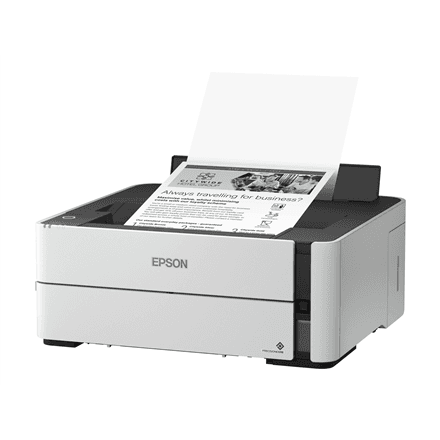
Epson EcoTank M1170 inkjet printer, mono, A4, duplex, Wi-Fi

The Epson EcoTank M1170 is a mono inkjet printer for offices and home offices that mainly print text: invoices, contracts, reports and school work. As an EcoTank model it uses a refillable ink tank instead of cartridges, prints A4 on both sides of the sheet and connects to a computer or network over USB, Ethernet or Wi-Fi.

  • Type: inkjet printer with EcoTank ink tank, print only
  • Printing: mono, black ink only
  • Speed: 20 ipm (ISO/IEC 24734)
  • Paper size: up to A4, duplex printing
  • Connectivity: USB, Ethernet, Wi-Fi, Wi-Fi Direct
  • Resolution: 1200 × 2400 dpi (black, normal quality)
  • Weight and colour: 4.3 kg, white housing

Description

An ink tank you refill from a bottle

EcoTank is the Epson printer range where ink does not sit in a small replaceable cartridge but in a tank built into the printer, which you refill from a bottle. The M1170 is a mono model and uses black ink only, so there are no colour tanks that run dry halfway through a job. The matching bottle code and the number of pages per fill are not given in the manufacturer data here, so check them on the Epson website before stocking up on ink.
Speed measured to a standard

Epson rates the M1170 at 20 ipm according to ISO/IEC 24734. Ipm means images, or pages, per minute, and this standard measures speed with typical office documents rather than a blank page or a one-line test sheet. That makes the figure comparable with other printers measured the same way, and gives a realistic idea of how quickly a long contract or report lands in the output tray.

Duplex printing saves paper

The M1170 can print on both sides of the sheet. For longer documents that means half the paper, thinner folders and less shelf space in the archive. Two-sided printing can be chosen in the printer driver for each job or set as the default if most of your documents run to several pages. The maximum paper size is A4, which covers standard office paper, forms and envelopes.

Connections for the whole office

With a USB cable the printer connects directly to one computer. Through the Ethernet port it joins the office network, so every colleague can print to it without one computer having to stay on. Wi-Fi puts the printer on your wireless network, while Wi-Fi Direct lets a laptop or phone connect to the printer directly even when there is no router nearby, for example in a meeting room or for a visitor.

Sharp text even in small print

Black print resolution in normal quality is 1200 × 2400 dpi. For text documents that means crisp letters even in small fonts, footnotes and the thin lines of tables. The printer comes in a white housing and weighs 4.3 kg, so one person can carry it from room to room, and it fits on an ordinary desk or shelf.

Who this printer is for

Small offices, accountants and lawyers who print a lot of text every day and have no need for colour; home offices and families with school children who print essays and forms; and companies that want one network printer shared by several employees. If you also need to scan, copy or print in colour, look at the EcoTank all-in-one models instead.

Specifications

General

BrandEpson
Product typeInkjet Printer
Colour of productWhite
Duplex functionsYes
InterfaceUSB, Ethernet, Wi-Fi, Wi-Fi direct connection
Maximum ISO A-series paper sizeA4
PrintingMono
Printing coloursBlack
EAN8715946663562

Display

Print resolution (black, normal quality)1200 x 2400 DPI

Ports

Ethernet LANYes

Connectivity

Wi-FiYes

Performance & capacities

Print speed (ISO/IEC 24734) mono20 ipm

Features

Print technologyInkjet

Dimensions & weight

Net weight4.3 kg

Questions & answers

Does this printer print in colour?

No. The M1170 is a mono printer and uses black ink only. Colour documents and photos are what the other EcoTank models are for.

Can the M1170 scan or copy?

Epson classifies the M1170 as an inkjet printer, and scanning or copying are not among its listed functions. It is a print-only device.

Can I print from my phone?

Yes, the printer supports Wi-Fi and Wi-Fi Direct, so a phone can print either through your home or office network or by connecting to the printer directly. Which app is recommended for this, the manufacturer does not specify.

Does it print on both sides of the paper?

Yes, duplex printing is supported. You can select it in the print settings whenever a document has several pages.

Reviews

No reviews yet

Bought this product? Be the first to share your experience.

Write a review

Only verified buyers can leave reviews.